Looking for a slider for a Beaver Builder site? Good news: you probably do not need a separate slider plugin. Beaver Builder ships its own Content Slider, Slideshow and Testimonials modules, and together they cover hero banners, photo galleries and rotating quotes. The catch is that all three are premium modules, so you need a paid license, which starts at $89 a year (prices checked 12 Nov 2026).
This Beaver Builder slider review explains what each module does, what they cannot do, what they cost, and when an add-on or a dedicated slider plugin makes more sense.
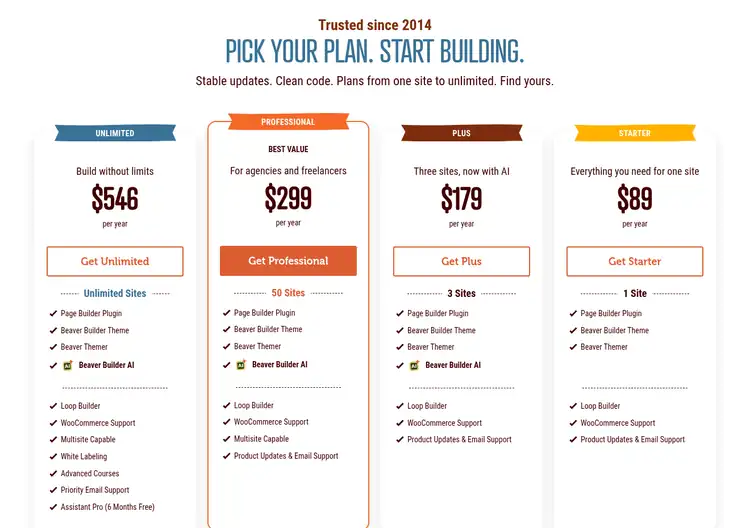
Source: Beaver Builder pricing page, captured 12 Nov 2026
What Is the Beaver Builder Slider?
There is no single product called “Beaver Builder Slider”. When people search for it they usually mean the slider modules built into Beaver Builder, the drag-and-drop WordPress page builder that has been around since 2014. You drop a slider module into any row, add slides, and edit everything on the front end like any other module.
The free Beaver Builder Lite plugin does not include them. Its WordPress.org listing names Slider, Tabs, Contact Form, Pricing Table and other modules as premium features, so the slider modules unlock only with a paid plan.
Key Content Slider Settings
- Auto play and pause on hover: on by default, with an optional play/pause button.
- Delay and transition: 5 seconds per slide by default, with a Slide or Fade transition (0.5s default speed).
- Navigation: dots are on by default; arrows (circle or square) are optional.
- Shuffle and loop: randomize slide order on each load, and loop back to the first slide.
- Height and width: 400px minimum height and 1,100px maximum content width by default, both adjustable.
- Link options: open in a new tab, add nofollow, or force a download, which is handy for affiliate or PDF slides.
Where the Built-In Slider Falls Short
The modules are deliberately simple. You will not find layer-based animation (moving individual elements on a timeline), parallax effects, or ready-made slider templates of the kind dedicated slider plugins offer. Content Slider also hides its text overlay when a slide uses a video background, so a video hero with text needs a workaround.
If you need more slider types, third-party add-ons fill the gap. Our PowerPack for Beaver Builder review covers one of the larger module packs. Because Beaver Builder accepts most WordPress widgets and shortcodes, you can also drop in a slider plugin’s shortcode with the HTML module.
Beaver Builder Pricing (Slider Modules Included)
Every paid plan includes the premium modules, so the slider is the same on every tier. You pick a plan by the number of live sites:
| Plan | Price | Live sites | Notable extras |
|---|---|---|---|
| Starter | $89/year | 1 | Page builder, Beaver Builder Theme, Beaver Themer |
| Plus | $179/year | 3 | Adds Beaver Builder AI |
| Professional | $299/year | 50 | Adds Multisite support |
| Unlimited | $546/year | Unlimited | Adds white labeling, priority support, 6 months of Assistant Pro |
Prices checked on 12 Nov 2026 from the official Beaver Builder pricing page.
Plans are billed yearly only (no monthly option), renew automatically, and come with a 30-day money-back guarantee. Staging sites do not count toward your limit. Qualifying nonprofits, students and teachers can ask for 10% off their first purchase. For current deals, see our Beaver Builder coupon page.
Beaver Builder Slider Pros and Cons
Pros
- Three slider-style modules (Content Slider, Slideshow, Testimonials) with no extra plugin to install or update.
- Per-slide CTA buttons and links, including nofollow and new-tab options.
- Mobile-specific photo and color settings on Content Slider.
- Same front-end, drag-and-drop editing as the rest of the builder.
Cons
- Not in the free Lite plugin; you need at least the $89/year Starter plan.
- No layer animations, parallax or slider template library.
- Text overlays are not available on video-background slides.
- Annual billing only, no monthly plan.
Also Read:
- Beaver Builder Lite Review: Is the Free Plugin Enough?
- PowerPack Beaver Builder Review
- Beaver Builder Coupon and Pricing
Beaver Builder Slider FAQs
Does Beaver Builder have a built-in slider?
Yes. Beaver Builder includes a Content Slider module for hero-style slides, a Slideshow module for photo slideshows, and a Testimonials module that rotates quotes.
Is the Beaver Builder slider available in Beaver Builder Lite?
No. The free Beaver Builder Lite plugin lists the Slider as a premium module, so you need a paid Beaver Builder plan to use it.
How much does Beaver Builder cost to get the slider modules?
Every paid Beaver Builder plan includes the slider modules. Plans cost $89, $179, $299 or $546 per year for 1, 3, 50 or unlimited live sites, checked on 12 Nov 2026.
Can the Beaver Builder Content Slider use video backgrounds?
Yes. Each Content Slider slide can use a photo, a video embed, a color or no background, but text overlay content is not available on slides with a video background.
Can I use another slider plugin with Beaver Builder?
Yes. Beaver Builder supports most WordPress widgets and shortcodes, so you can place a third-party slider with its widget or with a shortcode in the HTML module.
Does Beaver Builder offer a refund if the slider is not enough?
Yes. Beaver Builder backs all plans with a 30-day money-back guarantee on the initial purchase.
Conclusion: Beaver Builder Slider Review 2026
The Beaver Builder slider is not a standalone product but a set of solid, no-frills modules. Content Slider handles hero banners with per-slide CTAs, Slideshow handles galleries, and Testimonials handles social proof. For most sites that is enough, and it costs nothing extra once you own a Beaver Builder license. If you need cinematic, layer-animated sliders, budget for an add-on or a dedicated slider plugin as well.
