If you want a drag-and-drop page builder for WordPress without paying anything, Beaver Builder Lite is one of the safest places to start. This Beaver Builder Lite review covers what the free plugin actually does, where it stops, and when the paid plans (from $89 a year) are worth it.
The short answer: Lite is a genuinely usable front-end builder with 15 basic modules, responsive rows and no site limit. It is not a full website builder, though. Forms, sliders, templates, theme building and AI all sit behind a paid license.
What Is Beaver Builder Lite?
Beaver Builder Lite is the free version of Beaver Builder, a WordPress page builder that has been around since 2014. It is listed on WordPress.org as “Beaver Builder Page Builder – Drag and Drop Website Builder”, with more than 100,000 active installations and a 4.7 out of 5 rating from 394 reviews at the time of writing.
You edit on the front end of your site: open a page, launch Beaver Builder from the top bar, and drag rows, columns and modules into place while seeing the live result. The current version (2.11.1.2) needs WordPress 6.8 or higher and PHP 7.4 or higher.
Beaver Builder Lite Features
15 Basic Content Modules
The free plugin includes Box, Photo, Button, Button Group, Callout, Call to Action, Heading, Icon, Menu, Number Counter, Text Editor, HTML, Audio, Video and Sidebar modules. That covers a typical landing page or about page: headings, text, images, buttons and an embedded video.
Flexbox and CSS Grid With the Box Module
The Box module lets you build flexbox and CSS grid layouts, with a few presets to start from. Combined with full-width, column-based rows, it gives you more layout control than the default block editor without touching code.
Row Backgrounds
Rows can use a photo, a solid color or a video background. Keep background videos short and compressed, because a heavy file will slow the page down.
Responsive Layouts
Layouts are mobile-friendly out of the box, so columns stack on smaller screens. You can check how a page looks on different devices before publishing.
Shortcodes, Widgets and Custom CSS
You can drop WordPress widgets and shortcodes into a layout, which means most other plugins still work inside Beaver Builder pages. You can also add your own CSS classes and IDs, and developers can build custom modules.
Lightweight Output
Beaver Builder says it only loads the assets a layout needs and writes lean, semantic markup. That matters if you care about page speed and Core Web Vitals.
What You Do Not Get in the Free Version
- Premium modules such as Contact Form, Tabs, Slider, Pricing Table, Map, Blog Posts and Subscribe Form.
- Pre-made layout templates, and saving, exporting or reusing layouts, rows and modules.
- Global color palettes and global styles.
- The Beaver Builder Theme, Beaver Themer for headers, footers and archives, and Beaver Builder AI.
- Ticket support. Lite users get very limited help on the WordPress.org forums, plus the knowledge base and community groups.
If you need deeper modules without moving to a full plan, third-party add-ons exist; see our PowerPack Beaver Builder add-on review.
Beaver Builder Pricing: When to Upgrade
Lite costs nothing. The paid plans are billed yearly only (there is no monthly option), renew automatically, and all include the page builder, Beaver Builder Theme, Beaver Themer, premium modules and unlimited staging sites.
| Plan | Price per year | Live sites | Notable extras |
|---|---|---|---|
| Lite | Free | Unlimited | Basic modules only, forum support |
| Starter | $89 | 1 | Premium modules, templates, Themer |
| Plus | $179 | 3 | Adds Beaver Builder AI |
| Professional | $299 | 50 | Adds multisite support |
| Unlimited | $546 | Unlimited | White labeling, priority support, 6 months of Assistant Pro |
Prices checked on 8 Nov 2026 from the official Beaver Builder pricing page.
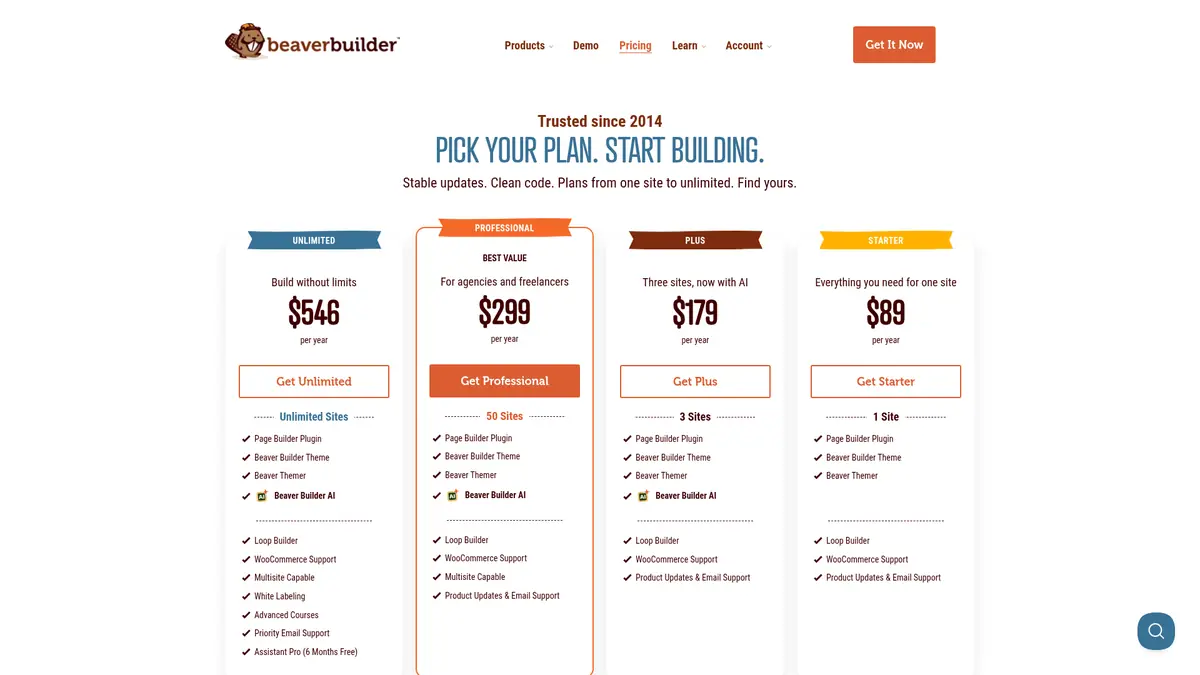
Source: Beaver Builder pricing page, captured 8 Nov 2026
Every paid plan has a 30-day money-back guarantee, and qualifying nonprofits, students and teachers can get 10% off the first purchase. Our Beaver Builder coupon page lists the official offers we could verify.
Beaver Builder Lite Pros and Cons
Pros
- Free with no site limit and no license key.
- True front-end, drag-and-drop editing with responsive rows.
- Box module brings flexbox and CSS grid layouts to the free tier.
- Works with most themes, widgets and shortcodes.
- Lean output that loads only the assets a page uses.
Cons
- No contact form, slider, tabs or pricing table modules.
- No templates or saved layouts, so every page starts from scratch.
- No theme builder for headers, footers or archives.
- Very limited free support.
- Paid plans are annual only, with no monthly billing.
Also Read:
- Beaver Builder Coupon: Plans From $89/yr
- Beaver Builder vs Divi
- PowerPack Beaver Builder Add-on Review
Beaver Builder Lite FAQs
Is Beaver Builder Lite really free?
Yes. Beaver Builder Lite is the free version of the page builder on WordPress.org. You can use it on as many sites as you like, with no license key, but it only includes the basic modules and community forum support.
What is missing from Beaver Builder Lite compared with Pro?
Lite leaves out the premium modules (contact form, tabs, slider, pricing table, map, blog posts and subscribe form), pre-made layout templates, saving and reusing layouts, global colors and styles, the Beaver Builder Theme, Beaver Themer and Beaver Builder AI.
How much does Beaver Builder Pro cost?
Paid plans are billed yearly only: Starter is $89 for 1 site, Plus is $179 for 3 sites, Professional is $299 for 50 sites and Unlimited is $546 for unlimited sites. Prices were checked on the official pricing page on 8 Nov 2026.
Does Beaver Builder Lite work with my current theme?
Beaver Builder says the plugin works with almost any WordPress theme, and Lite works on pages, posts and custom post types. You enable the post types you want under Settings, then Beaver Builder in your dashboard.
Can I upgrade from Beaver Builder Lite without losing my layouts?
Layouts built with Lite are made with the same page builder that the paid plans use, so a paid license adds features to the builder you already know. Every paid plan has a 30-day money-back guarantee if the upgrade is not a good fit.
Is there a Beaver Builder discount for nonprofits or students?
Beaver Builder offers 10% off the first purchase for qualifying nonprofits, students and teachers. You contact their team before buying, and the discount does not apply to renewals.
Conclusion: Beaver Builder Lite Review 2026
Beaver Builder Lite is one of the better free page builders for WordPress: stable, lightweight and easy to learn, with enough modules for simple pages. Its limits are clear, though. There are no forms, templates or theme building, and support is minimal.
Start with Lite to see if the editor suits you. If you hit those walls, Starter at $89 a year covers one site, and Plus at $179 adds AI and two more sites, all with a 30-day refund window.
