If you build sites with Beaver Builder, you’ve probably noticed its stock module set covers the basics but stops short of things like mega menus, login pages, or popups. PowerPack is the addon most people reach for to fill those gaps, and this PowerPack Beaver Builder review looks at what you actually get, what it costs right now, and who should skip it.
The short answer: PowerPack is worth it if you build more than one or two Beaver Builder sites. The Core Toolkit costs $69 a year for unlimited sites (it was $49 during a sale when we checked), adds 90+ modules and 400+ templates, and comes with a 14-day refund window. If you only need a handful of extra modules, start with the free Lite version first.
What Is PowerPack for Beaver Builder?
PowerPack is a premium addon for the Beaver Builder page builder, made by IdeaBox Creations. It plugs into the Beaver Builder editor, so its modules show up in the same drag-and-drop panel as the built-in ones, and you don’t need to write code to use them.
It works with every Beaver Builder edition from version 2.2 up, including the free Lite plugin, and with Beaver Themer for dynamic layouts. There’s also a separate WooCommerce addon called WooPack, sold alone or bundled with PowerPack. If you haven’t settled on Beaver Builder itself yet, our Beaver Builder review covers the builder in depth.
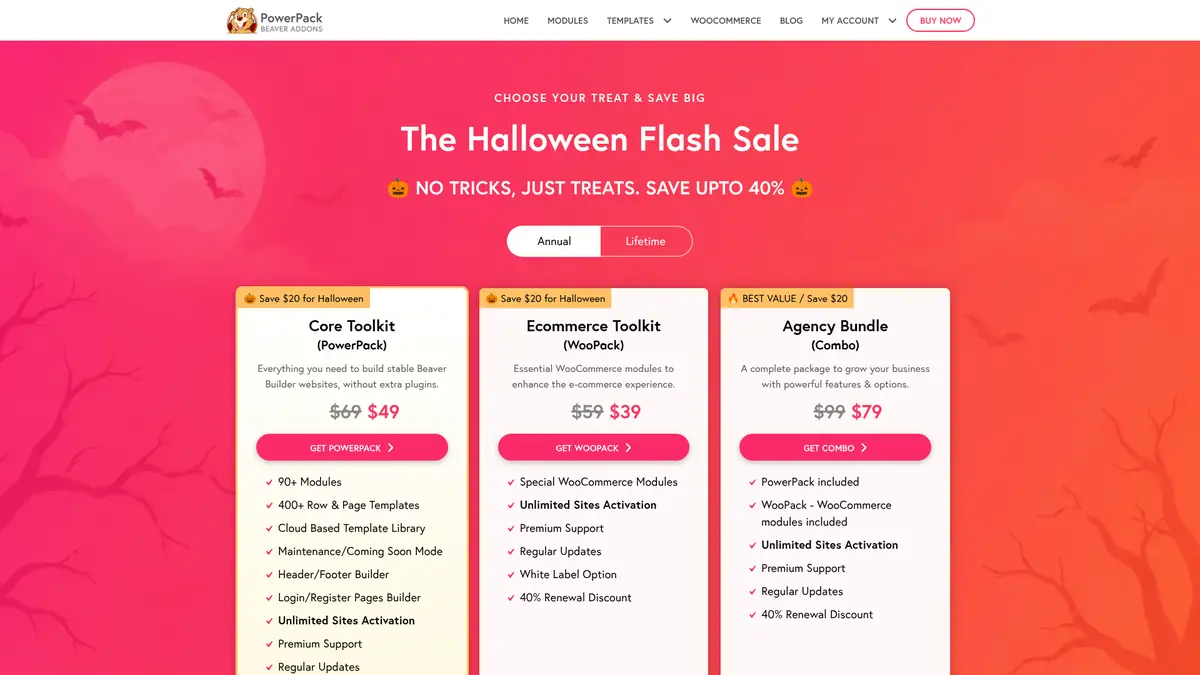
Source: PowerPack pricing page, captured 11 Nov 2026
Best Features of PowerPack Beaver Builder Addon
90+ Modules
This is the main reason to buy it. The paid version adds modules that stock Beaver Builder doesn’t have, including:
- Advanced Menu, One Page Navigation, and Breadcrumbs for site navigation
- Modal Popup Box with on-click, auto-load, and exit-intent triggers
- Content Grid, Content Tiles, and Post Timeline for blog and magazine layouts
- Filterable Gallery, Image Hotspot, Image Comparison, and Logo Carousel
- Pricing Table, Testimonials, Team, and Countdown Timer
- FAQ and How-to modules with schema markup
- Form stylers for Gravity Forms, Ninja Forms, Formidable Forms, WPForms, and Contact Form 7
400+ Row and Page Templates
PowerPack includes a cloud template library with full page layouts and individual sections (rows), plus ready-made header, footer, coming soon, and maintenance layouts. It’s a quick way to rough out a client site and then restyle it.
Header and Footer Builder
Beaver Builder on its own designs page content, not your theme’s header and footer. PowerPack lets you build a custom header and footer with the Beaver Builder editor and apply it across the whole site, which is handy if your theme’s options are limited and you don’t want to pay for Beaver Themer just for that.
Login and Registration Page Builder
You can replace the default WordPress login screen with a page you design in Beaver Builder, and build signup pages with the Registration Form module. The Login Form module also supports Facebook and Google login.
Maintenance and Coming Soon Modes
Switch a site into maintenance or coming soon mode with a page you design yourself, and whitelist IP addresses so you and your client can still preview the live site without logging in.
White Label and Unlimited Sites
Every paid license works on unlimited sites, and you can rename the plugin, change the developer name, and hide it from the plugin list. That matters for agencies and freelancers who hand sites over to clients. PowerPack is also translation-ready (WPML, Polylang, TranslatePress) and tested on WordPress Multisite.

PowerPack Pricing 2026
PowerPack sells three products, each as a yearly license or a one-time lifetime license. All plans cover unlimited sites.
| Plan | Annual (regular) | Lifetime (regular) | What’s included |
|---|---|---|---|
| Core Toolkit (PowerPack) | $69/yr | $399 once | 90+ modules, 400+ templates, header/footer and login builders, white label |
| Ecommerce Toolkit (WooPack) | $59/yr | $269 once | WooCommerce modules, white label |
| Agency Bundle (PowerPack + WooPack) | $99/yr | $669 once | Both plugins |
Prices checked on 11 Nov 2026 from the official PowerPack pricing page.
When we checked, a Halloween sale was still running on the official site: $49, $39, and $79 a year for the three annual plans, and $259, $179, and $399 for lifetime. The site doesn’t show an end date, so treat those as temporary and check the pricing page before you buy.
A few billing details worth knowing:
- Annual licenses include one year of updates and support and renew automatically, with a 40% renewal discount.
- If you let the license lapse, PowerPack keeps working on your sites; you just stop getting updates and support.
- Refunds are available within 14 days of the first purchase if support can’t fix your issue.
Remember that PowerPack sits on top of Beaver Builder, so budget for that too. Our Beaver Builder coupon page lists the builder’s current plans and deals.
PowerPack Lite vs PowerPack Pro
There’s a free version, PowerPack Lite for Beaver Builder, on WordPress.org. It has 6,000+ active installs and a 5-star average across 243 reviews, and its latest update (version 1.3.2) shipped on 15 Oct 2026. Lite includes a small set of modules: Info Box, Info List, Dual Button, Smart Heading, Fancy Heading, Icon/Number List, Business Hours, Divider, Contact Form 7 styler, Facebook and Twitter modules, and row separators.
Lite is a good way to test how PowerPack modules feel inside the editor. The template library, header/footer builder, login pages, popups, and most of the modules listed above are only in the paid version.
PowerPack Pros and Cons
Pros
- Fills real gaps in stock Beaver Builder: menus, popups, login pages, post grids, and schema-ready FAQs
- Unlimited sites on every plan, so the price per site drops fast for agencies
- Modules and extensions can be switched off individually
- Works with Beaver Builder Lite as well as the paid editions, and with Beaver Themer
- Free Lite version to try before buying
Cons
- Only useful if you build with Beaver Builder; it doesn’t work with other page builders
- WooCommerce modules cost extra (WooPack or the Agency Bundle)
- Annual licenses auto-renew, so cancel ahead of time if you don’t want the renewal
- No free trial of the paid version; the 14-day refund is your safety net
PowerPack Beaver Builder FAQs
How much does PowerPack for Beaver Builder cost?
The PowerPack Core Toolkit lists at $69 a year or $399 for a lifetime license, both for unlimited sites. WooPack is $59 a year and the Agency Bundle with both plugins is $99 a year. Prices were checked on 11 Nov 2026, when a sale had lowered them temporarily.
Does PowerPack work with the free Beaver Builder Lite plugin?
Yes. PowerPack supports Beaver Builder 2.2 and above, including the free Lite plugin and the Standard, Pro, and Agency editions.
Is there a free version of PowerPack?
Yes. PowerPack Lite for Beaver Builder is free on WordPress.org with a small set of modules such as Info Box, Dual Button, Smart Heading, and Business Hours. The template library, header and footer builder, and most modules need a paid license.
Does PowerPack stop working when the license expires?
No. PowerPack keeps working on your sites after an annual license expires, but you no longer get plugin updates or support. Annual licenses renew automatically with a 40% renewal discount.
Can I get a refund on PowerPack?
PowerPack offers a refund if you request it within 14 days of your first purchase and support can't solve your issue. There is no free trial of the paid version.
Do I need WooPack as well as PowerPack for a WooCommerce store?
Only if you want PowerPack's WooCommerce-specific modules for product and shop pages. WooPack is sold separately for $59 a year or bundled with PowerPack in the $99 Agency Bundle, and it needs WooCommerce active.
Conclusion: PowerPack Beaver Builder Review 2026
PowerPack is one of the most complete addons for Beaver Builder. It turns the builder into something that can handle menus, popups, login pages, and headers and footers without extra plugins, and the unlimited-site license makes it good value if you build sites for clients.
It’s harder to justify for a single small site, where the free Lite version may be enough. If you’re on the fence, buy the annual Core Toolkit, use the 14-day refund window to test it on a real project, and upgrade to lifetime later if it sticks.
