Looking for an honest LearnDash review before you build courses on WordPress? Short answer: LearnDash is still one of the most complete course plugins for WordPress, but it is no longer the cheap option it used to be. On the official pricing page I checked on 3 Nov 2026, the cheapest plan is $350 a year for one site, and it now comes bundled with The Events Calendar, Give and Kadence.
Below, I cover what LearnDash does, how building a course works, the features that matter, the current pricing, the real downsides and who should buy it.
What Is LearnDash?
LearnDash is a learning management system (LMS) plugin for WordPress. It was first launched in 2013 and is now owned by Liquid Web, which is why its product and pricing pages live on liquidweb.com. You install it on your own WordPress site, so you keep control of your content, student data and payments.

LearnDash says it has about 100,000 active WordPress installs and has taught 25 million learners. Those are company figures, so treat them as marketing claims rather than independent numbers.
Who Is LearnDash Best For?
- Course creators who already use WordPress and want courses, memberships and a blog on one site.
- Businesses running staff or customer training that need quizzes, certificates and progress reports.
- Agencies and freelancers building course sites for clients, since the multi-site plans get much cheaper per site.
- Training companies selling to organizations, thanks to group seats and multi-instructor tools.
It is a weaker fit for people who want a fully hosted platform with hosting, security and updates handled for them.
How Does LearnDash Work?
1. Install and set up the plugin
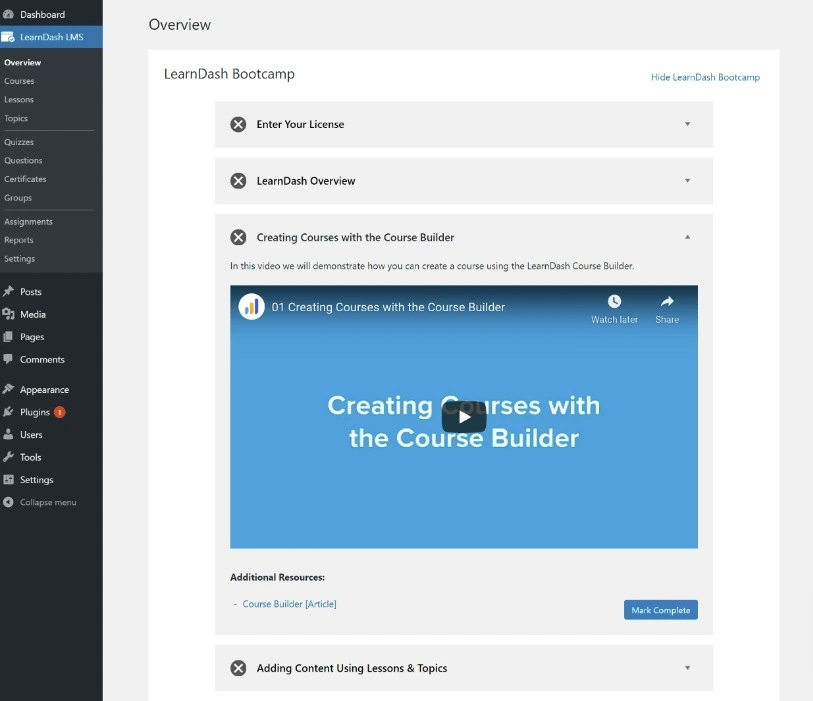
After you buy a plan, you install LearnDash on your WordPress site and activate your license. The setup wizard and help videos walk you through the basic settings.
2. Create a course
Each course is made of lessons, topics, quizzes and assignments. You can write lesson content in the normal WordPress block editor and add video, PDFs and downloads.
3. Organize it with the course builder
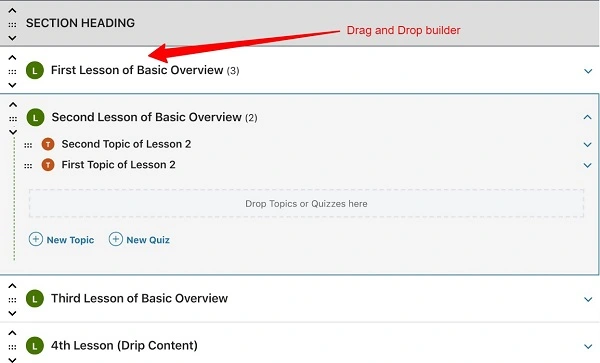
The drag-and-drop course builder lets you reorder lessons, topics and quizzes from one screen. LearnDash also offers an AI course builder that turns a topic description into a draft outline you can edit.
4. Add quizzes and certificates
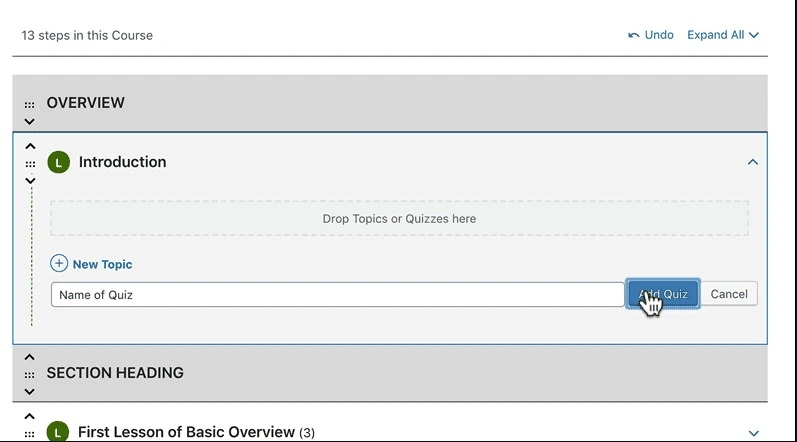
The quiz builder supports 8 question types, including multiple choice, essay, sorting and fill-in-the-blank, plus passing scores, timers and retakes. You can award a certificate when a learner passes a quiz or finishes a course.
5. Choose access and sell
You decide how people get in: open, free with registration, one-time payment, recurring payment or closed (you enroll people manually). Payments run through Stripe and PayPal, or through WooCommerce if you already use it. LearnDash does not take a cut of your sales, but Stripe and PayPal still charge their normal fees.
LearnDash Features That Matter
Quizzes and assessments
This is still LearnDash’s strongest area. Question banks, timers, passing scores, retake limits, essay grading and assignment uploads make it suitable for real training and certification, not just simple knowledge checks.
Drip content and prerequisites
You can release lessons on a schedule or a set number of days after enrollment, and require learners to finish one course or lesson before the next. That keeps learners on a set path.
Focus Mode
Focus Mode hides your site’s header, sidebar and footer while a learner is in a lesson and shows a clean course outline and progress bar instead, so the course feels like an app rather than a blog page.
Built-in memberships (MemberDash)
MemberDash is now built into LearnDash, so you can create free and paid membership tiers, sell monthly or yearly subscriptions and course bundles, and drip content by membership level without buying a separate membership plugin. Older reviews that list “limited membership features” as a con are out of date on this point.
Groups and multiple instructors
You can sell group seats so one purchase enrolls a whole team, let a client’s manager handle their own learners, and give instructors a front-end role to build courses without touching the WordPress dashboard. Learners can also leave course reviews and ratings.
Reporting
LearnDash reports cover enrollments, completion rates, quiz performance and individual learner progress, so you can spot where students drop off. For an older look at the reporting add-on, see our LearnDash ProPanel review.
Automated notifications
You can send emails when someone enrolls, finishes a lesson, passes or fails a quiz or submits an assignment.

LearnDash Pricing
LearnDash is sold as a yearly license, and every plan now includes the full Liquid Web software package: LearnDash, The Events Calendar, Give and Kadence. The only thing that changes between plans is the number of sites.
| Plan | Price per year | Cost per site | Best for |
|---|---|---|---|
| 1 site | $350 | $350 | A single course or training site |
| 10 sites | $599 | $59.90 | Freelancers with a few client sites |
| 25 sites | $799 | $31.96 | Small agencies |
| 50 sites | $899 | $17.98 | Larger agencies and networks |
| 100 sites | $999 | $9.99 | Multisite networks and big portfolios |
Prices checked on 3 Nov 2026 from the official LearnDash pricing page on liquidweb.com. All prices in USD.
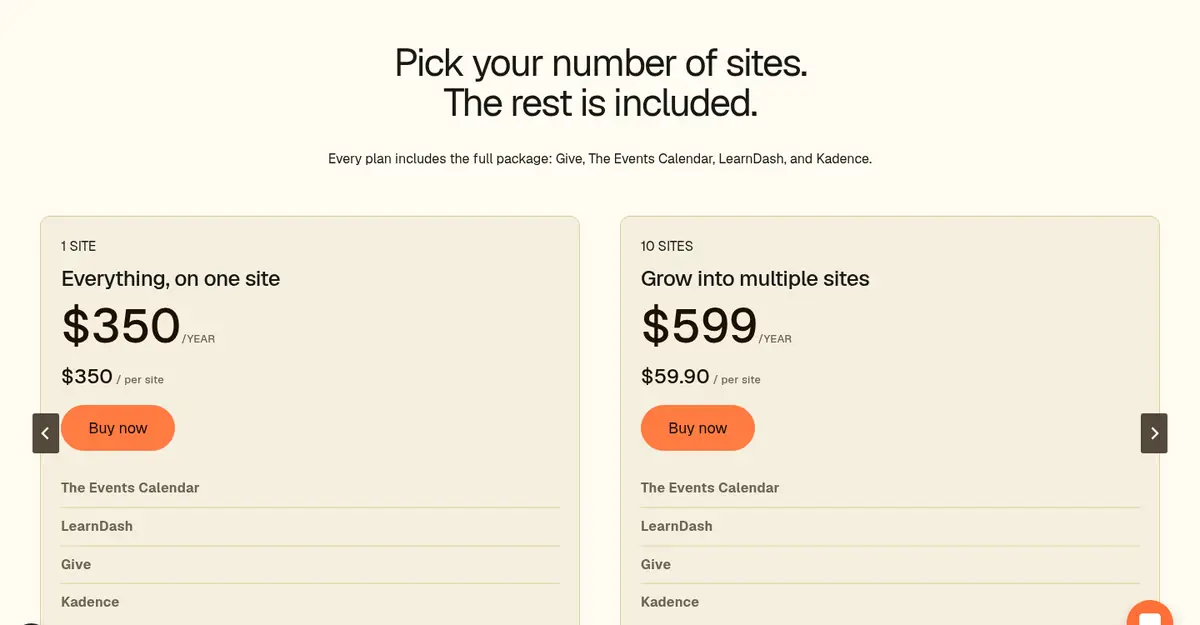
Source: LearnDash pricing page, captured 3 Nov 2026
A few things to know before you buy:
- No free plan. You can request a free 48-hour demo site with no credit card instead.
- 30-day refund window. Liquid Web’s LearnDash refund policy covers requests made within 30 days of the first purchase of an annual plan. Cancelling auto-renewal does not trigger a refund on its own.
- Licenses renew yearly, and you get renewal reminders 14 days before the date.
- Hosting is not included. You still pay for WordPress hosting, and a busy course site needs a decent host.
- Older plan names. If you see Essentials, Pro or Elite in other guides, those were earlier LearnDash plans. The official pricing page I checked lists only the site-count bundles above.
For a plan-by-plan breakdown, read our LearnDash pricing review.
LearnDash Pros and Cons
Pros
- One of the most capable quiz and assessment builders among WordPress LMS plugins.
- You own the site, the data and the customer relationship, with no LearnDash fee on sales.
- Memberships, subscriptions and course bundles are built in through MemberDash.
- Group seats, multiple instructors and front-end course creation suit corporate and agency use.
- Multi-site plans get very cheap per site, down to $9.99 per site on the 100-site plan.
- The plan also includes Kadence, The Events Calendar and Give at no extra cost.
Cons
- $350 a year for a single site is expensive if you only need LearnDash.
- No free plan and no monthly billing on the plugin plans.
- You handle hosting, backups, security and plugin updates yourself.
- Email marketing and a built-in community are not included, so you will need other tools for those.
- There is a learning curve if you are new to WordPress.
Also Read:
LearnDash Review FAQs
How much does LearnDash cost?
On the official pricing page checked on 3 Nov 2026, LearnDash costs $350 a year for one site, $599 for 10 sites, $799 for 25 sites, $899 for 50 sites and $999 for 100 sites. Every plan includes LearnDash, The Events Calendar, Give and Kadence.
Is there a free version or free trial of LearnDash?
LearnDash has no free plan. You can request a free 48-hour demo site without a credit card, and Liquid Web's refund policy allows a refund request within 30 days of your first annual purchase.
Does LearnDash charge transaction fees?
LearnDash does not take a percentage of your course sales. Your payment processor, such as Stripe or PayPal, still charges its normal processing fees.
Can LearnDash sell memberships without another plugin?
Yes. MemberDash is built into LearnDash, so you can create membership tiers, sell monthly or yearly subscriptions and bundles, and drip content by membership level without a separate membership plugin.
Does LearnDash include hosting?
No. LearnDash is a WordPress plugin, so you need your own WordPress hosting. You are also responsible for backups, security and updates on that site.
Is LearnDash good for beginners?
LearnDash is manageable for beginners who already know WordPress, thanks to its setup wizard and drag-and-drop builder. If you have never used WordPress, a hosted course platform will be quicker to learn.
Conclusion: LearnDash Review 2026
LearnDash remains a serious, full-featured LMS for WordPress. Its quizzes, drip content, certificates, built-in memberships and group tools cover almost everything a course business or training team needs, and you keep full ownership of your site and revenue.
The catch is cost and upkeep. At $350 a year for one site, plus hosting, it only makes sense if courses are central to your business or you can use the bundled plugins too. Agencies running many sites get far better value. If that sounds like you, try the 48-hour demo first, then buy within the 30-day refund window so you can still change your mind.
