Comparing checkout and funnel tools before you decide on CartFlows? These three are the alternatives readers ask about most:
Hosted shopping cart for creators with checkout pages, order bumps, one-click upsells and a built-in affiliate centre, sold mainly as a one-time licence.
Hosted checkout platform for selling digital products, courses and subscriptions with drag-and-drop checkout pages, no coding needed.
WordPress page builder and funnel suite for landing pages, sales pages, checkouts and membership areas.
If you sell through WooCommerce and want more from each order, CartFlows is one of the first plugins you will hear about. This CartFlows review looks at what the plugin actually does today, what each plan costs, where it falls short, and who should buy it instead of a hosted funnel tool like ClickFunnels.
The short answer: CartFlows is worth it if your store already runs on WordPress and WooCommerce and you want order bumps, one-click upsells and A/B tests without a monthly SaaS bill. Paid plans currently start at $99 for the first year (renewing at $149), and there is a free version on WordPress.org you can test first. Below I cover the features, the real pricing, the pros and cons, and the best alternatives.
CartFlows Review at a Glance
| Aspect | Details |
|---|---|
| What it is | Funnel builder and checkout plugin for WordPress and WooCommerce |
| Free version | Yes, on WordPress.org (200,000+ active installs, 4.8/5 from 517 ratings) |
| Paid plans | Starter $99, Pro $199, Suite $299 for the first year |
| Renewal prices | $149, $299 and $449 per year |
| Lifetime option | Pro $699 (3 sites), Suite $999 (30 sites) |
| Refund window | 14 days |
| Best for | WooCommerce stores, course sellers and agencies that already use WordPress |
Prices checked on 4 Nov 2026 on cartflows.com/pricing. Plugin stats from WordPress.org on the same date.
What Is CartFlows?
CartFlows is a WordPress plugin that turns a WooCommerce store into a sales funnel. Instead of sending buyers through the standard cart and checkout pages, you build a “flow”: a landing or sales page, a custom checkout, optional order bumps, post-purchase upsells or downsells, and a thank-you page.
The plugin has been around since 2018 and is now part of the same company behind the Astra theme and Spectra. Because it runs inside your own WordPress site, you keep your products, customer data and payment gateways in WooCommerce and avoid the $97 to $297 monthly fees of hosted funnel builders. The trade-off is that you also look after hosting, caching and plugin updates yourself.
You design CartFlows pages with the builder you already use. It officially supports Elementor, Spectra, Bricks, Divi, Beaver Builder and the block editor, and ships ready-made funnel templates you can import in one click.
Best CartFlows Features
Modern checkout layouts
CartFlows replaces the default WooCommerce checkout with one-column, two-column, two-step and instant checkout styles. You can also override the store-wide checkout, so buyers who never enter a funnel still get the faster page. This is available in the free plugin.
Checkout field editor and product options
You can add, remove and reorder checkout fields, and paid plans add product options so buyers can pick a variation, quantity or add-on right on the checkout page instead of going back to the product page.
Dynamic order bumps
An order bump is a tick-box offer shown on the checkout page, such as “add the workbook for $19”. CartFlows Pro lets you show different bumps depending on what is in the cart or who the customer is, and offers several bump designs.
One-click upsells and downsells
After payment, Pro can show an upsell offer that the buyer accepts with one click, without entering card details again. If they decline, you can show a cheaper downsell. One-click charging works with supported gateways; CartFlows lists Stripe, PayPal, Square, Authorize.Net, Mollie (iDEAL), WooCommerce Payments and cash on delivery.
A/B split testing and funnel analytics
Pro lets you test two versions of a step and see which one earns more, and adds a revenue and conversion dashboard per flow. The Starter plan does not include A/B testing, order bumps or upsells, which is the main reason most stores end up on Pro.
Templates and page builder support
The template library covers ecommerce, course, ebook and lead-generation funnels. Every template is editable in your page builder, so the pages match the rest of your site.
Suite extras
The Suite plan bundles CartFlows Pro with Modern Cart Pro (a slide-out cart with in-cart upsells), Cart Abandonment Recovery Pro, Power Coupons Pro, one year of OttoKit Pro automation and a one-time 2,500-contact SureContact plan, plus priority support.
CartFlows Pricing 2026
CartFlows sells annual licences and, for Pro and Suite, lifetime licences. The prices below are the current first-year prices on the official pricing page; renewals are charged at the regular price shown in the last column. The page does not show an end date for the first-year discount.
| Plan | First year | Renews at | Sites | Lifetime |
|---|---|---|---|---|
| Starter | $99 | $149/yr | 1 | Not offered |
| Pro | $199 | $299/yr | 3 | $699 (or 6 x $119) |
| Suite | $299 | $449/yr | 30 | $999 (or 6 x $169) |
Prices checked on 4 Nov 2026 from cartflows.com/pricing. All prices in USD.
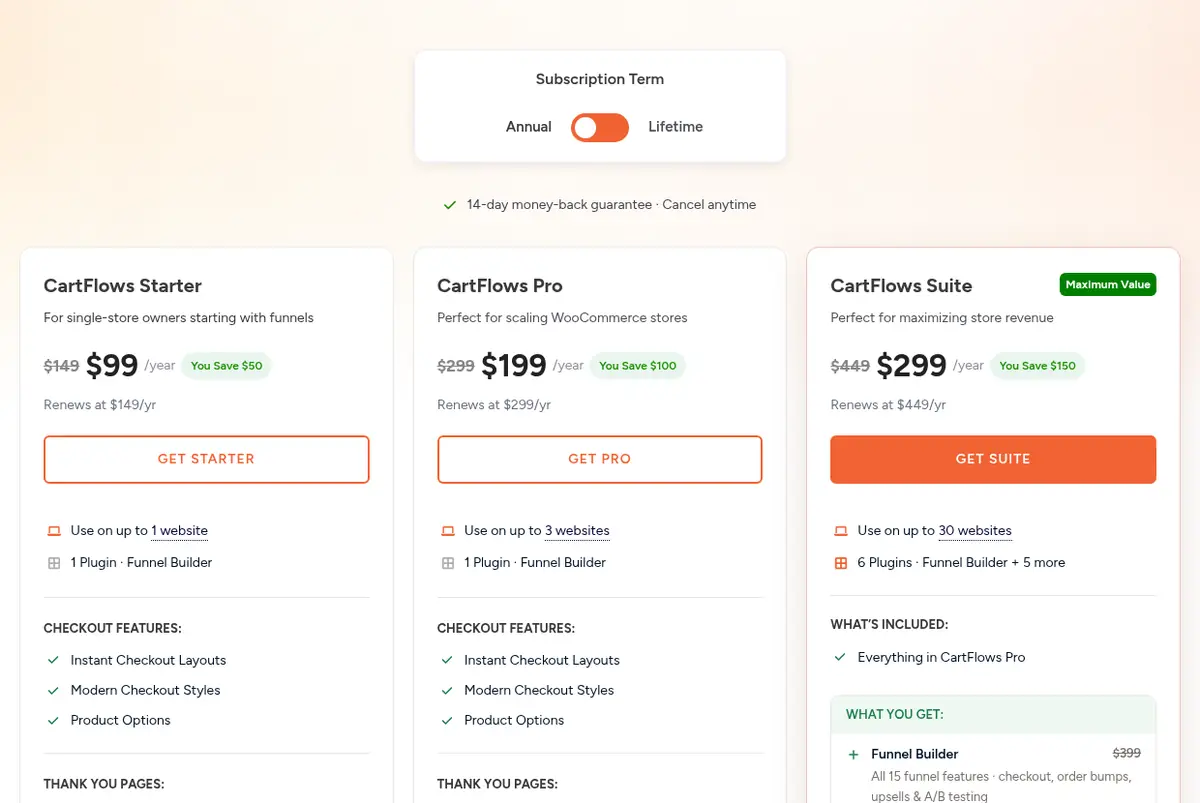
Source: CartFlows pricing page, captured 4 Nov 2026
Which CartFlows plan should you pick?
- Free: enough if you only want a better checkout page and simple flows.
- Starter ($99 first year): one site, premium checkout layouts, product options and custom thank-you pages, but no order bumps, upsells or A/B tests.
- Pro ($199 first year): the plan most stores need, since it unlocks order bumps, one-click upsells, A/B testing and analytics on up to 3 sites.
- Suite ($299 first year): worth it for agencies or stores that would otherwise buy cart abandonment, coupon and slide-out cart plugins separately; it covers 30 sites.
If you plan to keep CartFlows for three years or more, the Pro lifetime licence works out cheaper than renewing annually. I break down the maths in our CartFlows lifetime deal guide, and current discounts are tracked on our CartFlows coupon codes page.
CartFlows Pros and Cons
Pros
- No monthly SaaS fee: you pay a yearly or one-time licence and keep everything inside WooCommerce.
- Generous free version with modern checkout styles, templates and a checkout field editor.
- Works with the page builder you already use, including Elementor, Bricks, Divi and the block editor.
- One-click upsells and conditional order bumps can raise average order value without new traffic.
- Uses your existing WooCommerce payment gateways, taxes and shipping settings.
- Lifetime licences are available for Pro and Suite.
Cons
- Only works on WordPress with WooCommerce, so it is not an option for Shopify or hosted stores.
- The Starter plan leaves out order bumps, upsells and A/B testing, the features most people buy CartFlows for.
- Renewal prices are 50% higher than the first-year prices.
- Checkout and offer pages must be excluded from page caching, which takes some setup on many hosts.
- Deep design changes beyond the built-in style settings still need custom CSS or your page builder.
- Support is ticket-based; there is no phone support.
CartFlows Support and Documentation
CartFlows offers support through tickets from its website, with a 24/7 promise on paid plans and priority “VIP” support on Suite. There is a searchable documentation site, video tutorials, and a community group for users. The free plugin is supported through the WordPress.org forum.
CartFlows Alternatives
CartFlows is a strong fit for WooCommerce, but it is not the only option. If you want a hosted tool or a different pricing model, compare these:
- FunnelKit: the closest WooCommerce competitor, with funnels, checkout, upsells and built-in email automation.
- ThriveCart: a hosted cart sold mainly as a one-time licence; see our ThriveCart vs CartFlows comparison.
- ClickFunnels: an all-in-one hosted funnel builder billed monthly; see CartFlows vs ClickFunnels.
- SamCart: a hosted checkout platform for creators; read our SamCart review.
For the full list with pros and cons, see our best CartFlows alternatives.
Also Read:
CartFlows Review FAQs
Is CartFlows free?
Yes. CartFlows has a free plugin on WordPress.org with modern checkout styles, ready-made templates and a checkout field editor. Order bumps, one-click upsells, A/B testing and analytics need CartFlows Pro.
How much does CartFlows Pro cost?
CartFlows Pro costs $199 for the first year and renews at $299 a year for up to 3 websites. A lifetime Pro licence costs $699, or six payments of $119 (prices checked 4 Nov 2026).
Does CartFlows work without WooCommerce?
CartFlows is built around WooCommerce for checkout and payments, so you need WordPress with WooCommerce active to sell through its funnels.
Does CartFlows have a refund policy?
Yes. Every paid CartFlows plan comes with a 14-day money-back guarantee; you request the refund through a support ticket and your licence is deactivated.
Which page builders work with CartFlows?
CartFlows supports Elementor, Spectra, Bricks, Divi, Beaver Builder and the WordPress block editor, and its templates can be edited in any of them.
Can I use CartFlows on client websites?
Yes. CartFlows allows use on client sites; Pro covers 3 websites and Suite covers 30 websites per licence.
Conclusion: CartFlows Review 2026
CartFlows is one of the best value funnel tools for anyone already selling on WooCommerce. The free plugin is a genuine upgrade over the default checkout, and Pro adds the revenue features, order bumps, one-click upsells and A/B tests, that hosted tools charge monthly for.
It is not the right pick if you are not on WordPress, or if you want hosting, email and funnels in one dashboard. For everyone else, start with the free plugin, and move to Pro once you are ready to add offers. The 14-day refund window gives you time to test it on a real store.
