If you are searching for a Deadline Funnel review, you probably want to know one thing: is it worth paying for countdown timers when free timer widgets exist? The short answer is yes, but only if you run evergreen or automated offers, because Deadline Funnel gives every lead their own real deadline that stays the same across your emails, sales pages and checkout.
Plans start at $49 a month (or $39 a month billed yearly), every plan can be tried free for 14 days, and all plans come with a 30-day money-back guarantee. Below I cover how it works, the four current plans (including the newer Accelerate tier), integrations, pros and cons, and who should skip it.
Deadline Funnel Review at a Glance
| Aspect | Details |
|---|---|
| What it is | Personalized deadline, countdown timer and urgency tool for online offers |
| Free trial | 14 days on any plan (card required at sign-up, $0 due today) |
| Pricing | Start $49/mo, Create $99/mo, Accelerate $149/mo, Scale $199/mo (20% less billed yearly) |
| Refund | 30-day money-back guarantee |
| Best for | Course creators, coaches, info-product sellers and email marketers with evergreen funnels |
| Owner | Founded by Jack Born; acquired by itrinity in July 2024 |
Prices checked on 3 Nov 2026 from the official Deadline Funnel pricing page.
What is Deadline Funnel?
Deadline Funnel is a SaaS tool that adds real, per-person deadlines to your marketing. Instead of a generic timer that resets every time a visitor reloads the page, it records when each lead entered a campaign and counts down to their personal deadline. When the time is up, the offer page redirects to a page of your choice, so the urgency is genuine.
The tool was founded by marketer Jack Born and has been owned by the SaaS group itrinity (which also runs UptimeRobot and Mangools) since July 2024. On its pricing page Deadline Funnel says it has helped 20,000+ creators generate $100M in sales since 2017; that is the company’s own claim and I could not verify it independently.

Why a real countdown matters
Fake timers that restart on refresh can backfire: regular visitors notice, and it damages trust. A deadline that holds up across devices and emails lets you run an evergreen offer (for example, “20% off for 72 hours after you join my list”) without manually managing dates or relying on a virtual assistant.

How Does Deadline Funnel Work?
Setup is wizard-based and takes minutes rather than hours once your email tool is connected. Here is the typical flow:
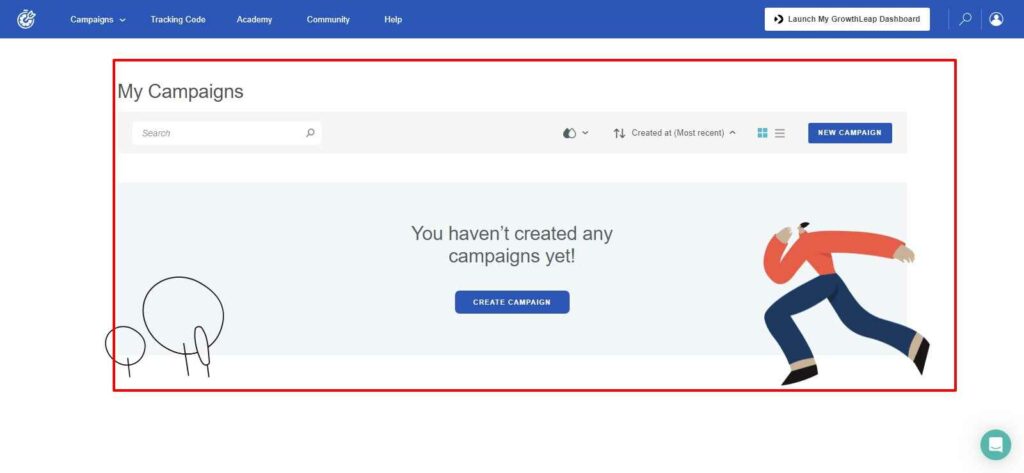
Step #1: Create a campaign
Log in, click “New Campaign”, name it and pick a campaign type. Current types include Evergreen, Tripwire Offer, Product Launch, Holiday Promo, Flash Sale, Abandoned Cart, Automated Webinar, Page-Only Deadline, Limited Quantity, Hybrid and Announcement Bar.

Step #2: Set the deadline length
Choose how long each lead gets. For example, if a subscriber starts tracking on Monday at 10:00 am with a three-day deadline, their offer ends on Thursday, and everyone else gets their own window based on when they joined.

Step #3: Connect your email tool
Deadline Funnel syncs with your email platform so the deadline in the email timer matches the one on the page. Direct integrations cover most popular email tools, and Zapier, Make and webhooks fill the gaps.

Step #4: Add your pages and the expired-offer redirect
Enter the URL of the offer page and the URL people should be sent to once their deadline passes, then add the tracking code or floating bar to your pages.

Watch this video to see how Deadline Funnel works:
Deadline Funnel Features
Floating bar and page timers
Add a floating countdown bar to landing, sales and checkout pages. You can change the template, size, placement, content and colors (custom colors and branding removal need Create or higher).
Email timers
Dynamic email countdown images personalized to each lead, synced with the page timer. Useful for launches, evergreen offers, welcome series, flash sales and abandoned-cart emails.
Automatic redirects
Once a lead’s deadline passes, Deadline Funnel sends them to a different page (for example, the full-price offer or a waitlist), which is what makes the urgency honest.
Social Proof
Listed on Create and higher plans: shows recent activity such as new subscribers or purchases from your campaigns, or custom events, on your pages.
Portals
Also from the Create plan, Portal is a pop-up widget that combines the lead’s countdown with content blocks such as social proof, reviews, a video, offer details and a call to action.
Reporting and analytics
The dashboard tracks leads, clicks and sales per campaign and sends an automated weekly email report. Data history is 90 days on Start and 6 months on Create and Scale, according to the pricing FAQ.
Blueprints
Onboarding sequences and blueprints give you a starting template for common campaigns so you do not rebuild similar funnels from scratch.
Deadline Funnel Pricing
Deadline Funnel has four plans. Every plan includes all 10+ campaign types, a 14-day free trial and the 30-day money-back guarantee; the difference is mainly campaigns, monthly leads and branding.
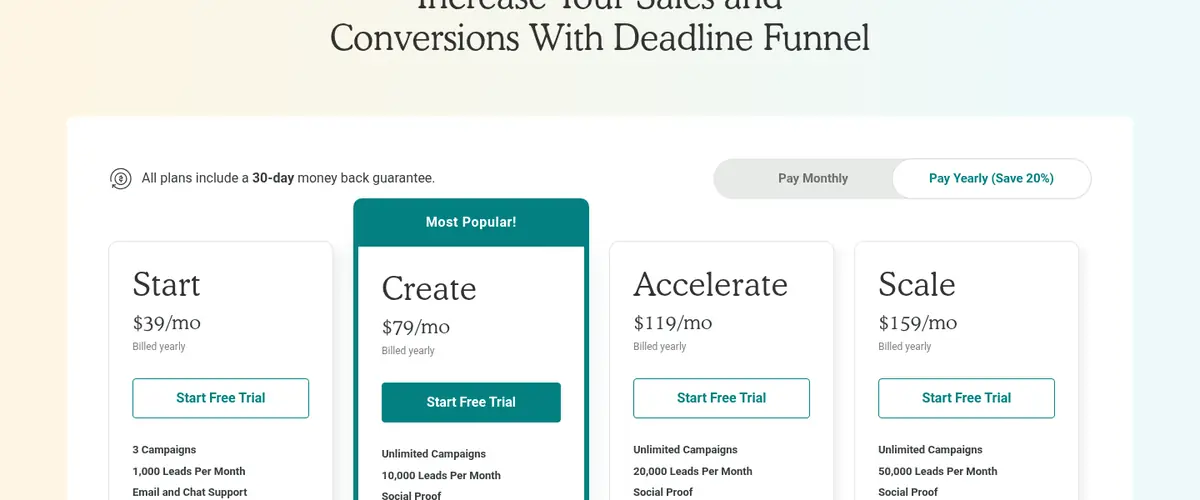
Source: Deadline Funnel pricing page (yearly billing), captured 3 Nov 2026
| Plan | Monthly | Annual (per month) | Campaigns | Leads per month |
|---|---|---|---|---|
| Start | $49 | $39 ($468/yr) | 3 | 1,000 |
| Create (most popular) | $99 | $79 | Unlimited | 10,000 |
| Accelerate | $149 | $119 | Unlimited | 20,000 |
| Scale | $199 | $159 | Unlimited | 50,000 |
Prices checked on 3 Nov 2026 from the official pricing page (USD; sales tax may apply).
Which plan should you pick?
- Start suits testing one evergreen funnel: 3 campaigns, 1,000 leads, email and chat support, but Deadline Funnel branding stays on and the pricing page does not list Social Proof or Portals for it.
- Create is the plan Deadline Funnel itself recommends: unlimited campaigns, 10,000 leads, Social Proof, Portals, custom colors, branding removed and priority support.
- Accelerate and Scale have the same features as Create, with 20,000 and 50,000 leads a month.
Watch the lead count: a subscriber who enters five campaigns counts as five leads, so busy lists hit the limit faster than you might expect.
For a plan-by-plan breakdown, see our Deadline Funnel pricing guide.
Deadline Funnel Integrations
The official integrations page lists native connections in these groups:
- Email marketing: ActiveCampaign, AWeber, ConvertKit, Drip, Flodesk, GetResponse, Klaviyo, Mailchimp, MailerLite, Ontraport, Constant Contact and more.
- CRM: HubSpot, Infusionsoft, Kartra, Close.io.
- Funnels and landing pages: ClickFunnels, Instapage, Leadpages, OptimizePress, OptinMonster, Thrive Architect, ThriveCart, Unbounce.
- Webinars: Demio, EasyWebinar, EverWebinar.
- Courses and memberships: Kajabi, LearnWorlds, Podia, SamCart, Teachable, Thinkific.
- Sites and ecommerce: Shopify (native app), WooCommerce, WordPress, Squarespace.
- Chatbots and automation: ManyChat, Chatfuel, Zapier, LeadsBridge.

Deadline Funnel Customer Support
Support is by email (help@deadlinefunnel.com) and live chat. Live chat runs Monday to Friday, 8am to 4pm EST, with email covering nights and weekends; Create and higher plans get priority support, and you can book a setup call for help with your first campaign.

Deadline Funnel Pros and Cons
Pros
- Deadlines are personal to each lead and do not reset on refresh or a new device.
- Email timers and page timers stay in sync automatically.
- Expired offers redirect automatically, so you never have to switch pages off by hand.
- Long list of native integrations, plus Zapier, Make and webhooks.
- 14-day free trial and a 30-day money-back guarantee on every plan.
Cons
- Starts at $49 a month, expensive next to free timer plugins if you only need a simple countdown.
- Start keeps Deadline Funnel branding and limits you to 3 campaigns.
- Leads are counted per campaign, so large lists can push you up a tier.
- Card required to start the trial.
- Live chat only during US weekday business hours.
What Customers Say
Deadline Funnel publishes testimonials from well-known marketers on its own site. For example, Chandler Bolt of Self-Publishing School says it is “the one piece of software that we’ve used in all phases of growth”, and Melyssa Griffin says it resulted in “over a million dollars in revenue”. These are the company’s selected quotes, not independent reviews, so treat them as such.

Deadline Funnel Alternatives
Thrive Ultimatum
Thrive Ultimatum is a WordPress plugin for evergreen and fixed countdown campaigns. It is cheaper if you already use Thrive Themes, but it only works on WordPress sites you control, while Deadline Funnel works on any page builder and syncs with emails. Read our Deadline Funnel vs Thrive Ultimatum comparison for details.
ClickFunnels
ClickFunnels is a full funnel builder with its own countdown elements. If you build everything inside ClickFunnels, its timers may be enough; Deadline Funnel adds per-lead deadlines that also sync with your emails. See Deadline Funnel vs ClickFunnels.
More options are covered in our Deadline Funnel alternatives guide.
Also Read:
Deadline Funnel FAQs
Does Deadline Funnel offer a free trial?
Yes. Every Deadline Funnel plan can be tried free for 14 days. You enter a card at sign-up, nothing is charged that day, and the plan price is billed when the trial ends unless you cancel from your dashboard.
How much does Deadline Funnel cost?
Deadline Funnel costs $49/mo for Start, $99/mo for Create, $149/mo for Accelerate and $199/mo for Scale. Paying yearly saves 20%, bringing them to $39, $79, $119 and $159 a month.
Does Deadline Funnel have a refund policy?
Yes. Deadline Funnel offers a 30-day money-back guarantee. Monthly plans can be refunded within 30 days of the first payment, and annual plans within 30 days of an annual payment.
How does Deadline Funnel count leads?
Deadline Funnel counts a lead each time a subscriber enters a campaign. One subscriber who enters five Deadline Funnel campaigns counts as five leads toward your monthly limit.
Does Deadline Funnel work with Shopify and WordPress?
Yes. Deadline Funnel has a native Shopify app for deadline and discount automation, and it works on WordPress, WooCommerce, Squarespace and most page builders through its tracking code and integrations.
Who owns Deadline Funnel?
Deadline Funnel was founded by Jack Born and was acquired by the SaaS group itrinity, effective July 1, 2024.
Conclusion: Deadline Funnel Review 2026
Deadline Funnel does one job very well: it gives every lead an honest, personal deadline that matches across your emails and pages, then closes the offer automatically. That is exactly what evergreen funnels need, and it is hard to fake reliably with free timers.
It is not cheap. If you send a few hundred leads a month through one or two campaigns, Start at $39 a month (billed yearly) is enough to test it; most businesses with an active list will want Create for unlimited campaigns and no branding. Use the 14-day trial to set up one evergreen campaign, and you have 30 days after your first payment to get a refund if it does not lift sales.
