How to Claim ManyCam Discounts and Official Deals
ManyCam does not publish reusable public coupon codes. The savings available right now are built into the official pricing page: the ManyCam 9 launch offer of up to 20% off the Studio and Premium annual plans, the low-cost Standard plan at $59/year, and a free version you can test before paying.
Step #1: Open the ManyCam pricing page through our link
Visit the ManyCam pricing page using our referral link. You land on manycam.com/buy with the For Individuals plans shown first and a For Businesses tab for teams.
Step #2: Pick the plan that matches your setup
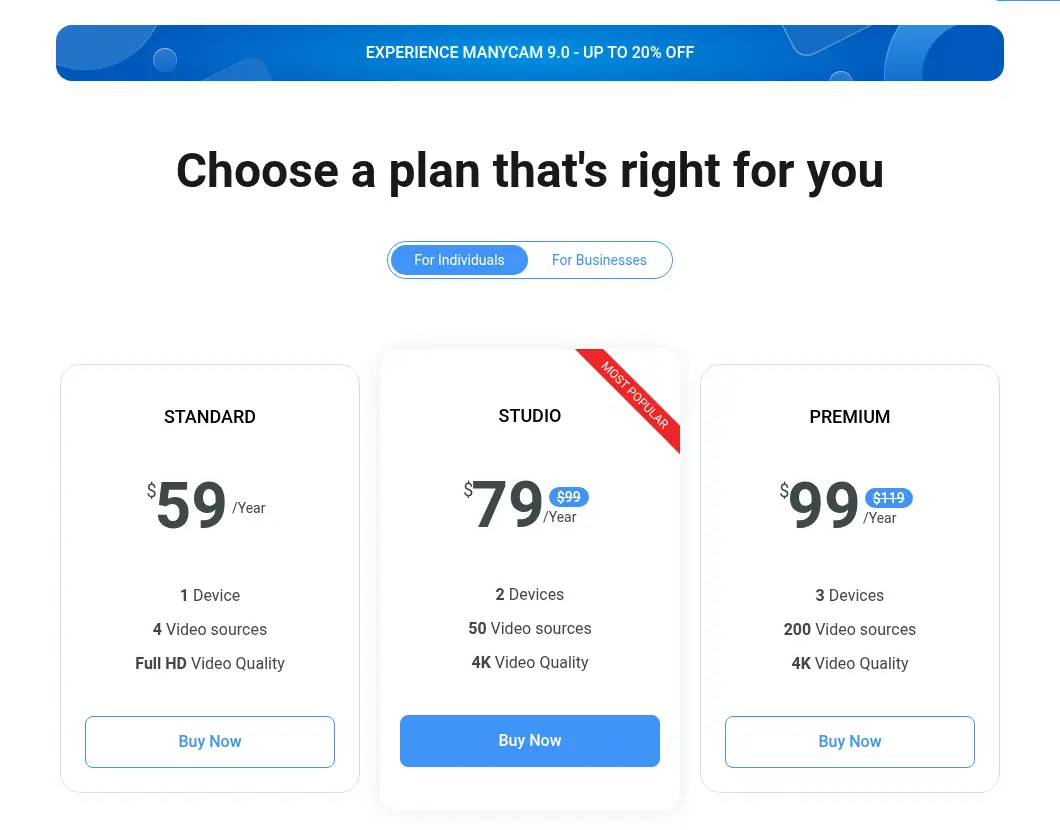
Choose by how many computers and video sources you need: Standard (1 device, 4 sources, Full HD), Studio (2 devices, 50 sources, 4K), or Premium (3 devices, 200 sources, 4K). The discounted prices are already shown on the Studio and Premium cards, so there is nothing to paste at checkout.
Step #3: Click Buy Now and complete checkout
Click Buy Now under your plan, sign in or create a ManyCam account, and pay. ManyCam says it supports most payment methods, including credit cards and bank transfer; the checkout page shows the options available in your country.
Step #4: Activate your subscription
Your license details arrive by email, usually within 10 to 15 minutes of payment. Activate the subscription in the ManyCam app to unlock paid features and remove the ManyCam watermark from your video.
Why Choose ManyCam?
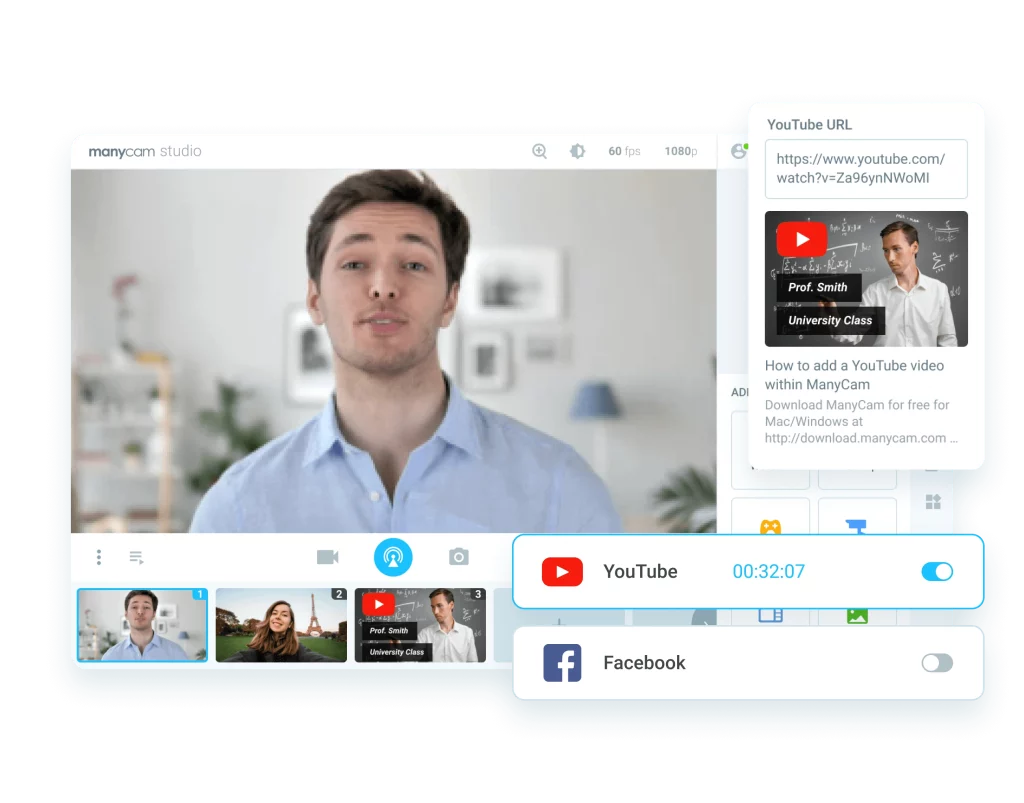
ManyCam is a virtual camera and live streaming app for Windows and Mac. It sits between your webcam and apps like Zoom, Google Meet, or YouTube, so you can layer sources, effects, and graphics into one polished feed. ManyCam says it has passed 100 million downloads. If you are new to going live, our live streaming introduction covers the basics first.
- Multiple video sources: Mix webcams, IP cameras, screen capture, images, and media files, then switch between them or show them picture-in-picture.
- Virtual backgrounds and blur (Studio and up): Replace or blur your background without a green screen.
- Multi-platform streaming: Standard streams to one RTMP destination at a time; Studio and Premium stream to several platforms at once.
- Teaching and presenting tools: Draw on a virtual whiteboard, add animated titles, and record your session for later.
- Works with your meeting apps: ManyCam appears as a webcam in conferencing tools. A paid subscription removes the ManyCam logo, and Studio and Premium support up to four virtual webcams with custom watermarks.
- Try before you buy: The free download lets you test the interface first, with the ManyCam watermark on your video.
Planning to edit your recordings afterwards? See our Filmora coupon guide or the Movavi Video Editor review. To decide where your videos should live, read YouTube vs Vimeo.
Also Read:
ManyCam Coupon FAQs
Does ManyCam have a working coupon code?
ManyCam does not publish public coupon codes. Its current savings are shown directly on the pricing page: the ManyCam 9 offer of up to 20% off Studio and Premium annual plans, applied without a code.
How much does ManyCam cost per year?
As of 18 Oct 2026, Standard is $59 per year, Studio is $79 per year (regularly $99), and Premium is $99 per year (regularly $119). Enterprise pricing is available from ManyCam sales.
Is ManyCam free to use?
Yes, you can download ManyCam for free to test it. Free video carries the ManyCam watermark, and features such as extra video sources, 4K output, and watermark removal need a paid subscription.
Which ManyCam plan includes virtual backgrounds?
Virtual backgrounds and background blur are included on ManyCam Studio and Premium, not on Standard. Studio and Premium also add unlimited RTMP streams for multistreaming.
Can I get a refund on a ManyCam subscription?
ManyCam handles refunds case by case. You request one through its support contact form, and once a refund is processed the license is disabled; ManyCam says support refunds usually show on your card in about 48 hours.
Does ManyCam still sell lifetime licenses?
The current ManyCam pricing page lists annual subscriptions only. Older lifetime licenses keep working for the version they were bought for, but they do not include upgrades to later major versions.
Final Thoughts on ManyCam Coupon Deals 2026
Skip old 35% or 75% off ManyCam codes; they are not on ManyCam’s site and the lifetime license they referred to is no longer sold. The real deal in 2026 is the ManyCam 9 pricing: Studio at $79/year instead of $99 and Premium at $99/year instead of $119, with Standard at $59/year if you only need one device in Full HD.
Start with the free download to check that ManyCam works with your camera and meeting apps, then pick the plan that matches your device and source count.
