Most budgeting apps tell you where your money went. PocketSmith is built to show you where it is going: it puts your bills, income and budgets on a calendar and projects your daily bank balance months or even decades ahead. If you are looking for a PocketSmith review because you want that kind of forward view, this guide explains what the app does, what each plan costs today and who should pay for it.
The short version: PocketSmith is one of the most capable forecasting tools for households, freelancers and people with money in more than one country. Paid plans start at $9.99/month billed annually (Foundation), there is a limited Free plan, and every paid plan comes with a 14-day money-back guarantee. Prices below were checked on PocketSmith’s own pricing page on 20 Oct 2026.
What Is PocketSmith?
PocketSmith is a personal finance and budgeting app founded in 2008 by Jason Leong (CEO) and James Wigglesworth (CTO). Its mission, in the company’s own words, is to help you make better financial decisions by forecasting your future bank balances. It runs in the browser, with mobile and desktop apps listed on its site.
Where many budgeting tools work in fixed monthly buckets, PocketSmith lets you budget by day, week, fortnight, month, quarter and more, then shows how each scheduled bill or paycheck changes your projected balance. That makes it especially useful if your income is irregular, you pay quarterly taxes, or you juggle accounts in several currencies.
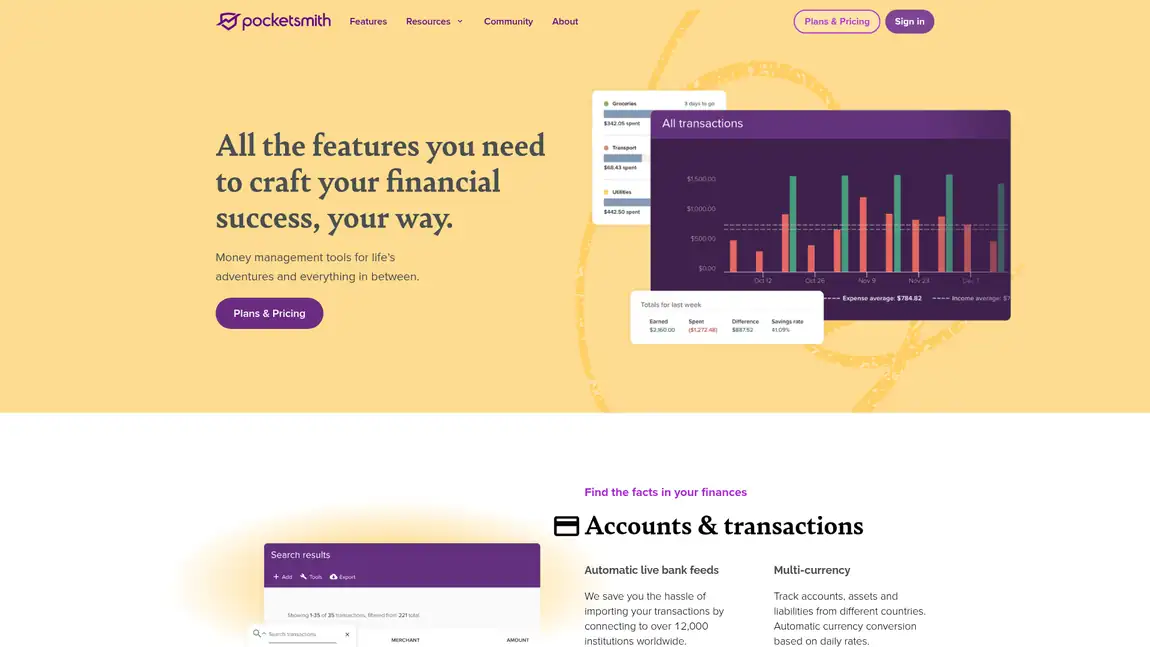
Source: PocketSmith features page (pocketsmith.com/features), captured 20 Oct 2026
PocketSmith’s Best Features
Cash flow forecasting and what-if scenarios
This is the reason to choose PocketSmith. It projects daily balances 10 years ahead on Foundation, 30 years on Flourish and 60 years on Fortune (6 months on Free). What-if scenarios let you test a change, such as a new car loan or a pay cut, and see the effect before you commit.
Budget calendar and flexible budgets
Bills and budgets live on a calendar, so you can check your expected balance on any day. Budgets can run daily, weekly, fortnightly, monthly, quarterly and more, rollover budgeting supports an envelope-style approach, and the Safe Balance feature shows what is safe to spend once upcoming income and expenses are counted.
Multi-currency accounts
Accounts, assets and liabilities in different countries are converted automatically using daily exchange rates. Flourish and Fortune can connect banks from all countries, which few budgeting apps handle as cleanly. If you also move money abroad, our TransferWise (Wise) review covers the transfer side.
Reports, dashboards and net worth
You get custom dashboards, an income and expense statement, trend graphs, a cashflow statement and a net worth tracker for property, mortgages, vehicles and loans. Graph types include line, area, column, bar, pie and Sankey charts.
Collaboration, files and AI access
Collaborator access lets you invite a partner, family member or financial coach into your account. A built-in file browser stores documents like insurance policies and mortgage papers. PocketSmith also offers an MCP server that connects your data to compatible AI assistants such as ChatGPT and Claude, with a choice of read-only access or letting the assistant help organize transactions.
Security and privacy
PocketSmith says your data is encrypted in transit and at rest, two-factor authentication is available on all plans, and the app shows no advertisements because it makes money from subscriptions rather than your data.
PocketSmith Pricing
All prices are in USD. Annual billing saves 33% on every paid plan, and PocketSmith also bills quarterly according to its FAQ.
| Plan | Monthly | Annual (per month) | Key limits | Best for |
|---|---|---|---|---|
| Free | $0 | $0 | 2 accounts, 12 budgets, 2 dashboards, 6-month projection, manual imports | Trying the calendar and forecast |
| Foundation | $14.95 | $9.99 | 6 connected banks from 1 country, 6 dashboards, 10-year projection, unlimited accounts and budgets | Single-country households |
| Flourish | $24.95 | $16.66 | 18 connected banks from all countries, 18 dashboards, 30-year projection | Families and multi-currency users |
| Fortune | $39.95 | $26.66 | Unlimited connected banks and dashboards, 60-year projection, priority email support | Complex finances, advisors and coaches |
Prices checked on 20 Oct 2026 from the official PocketSmith pricing page.
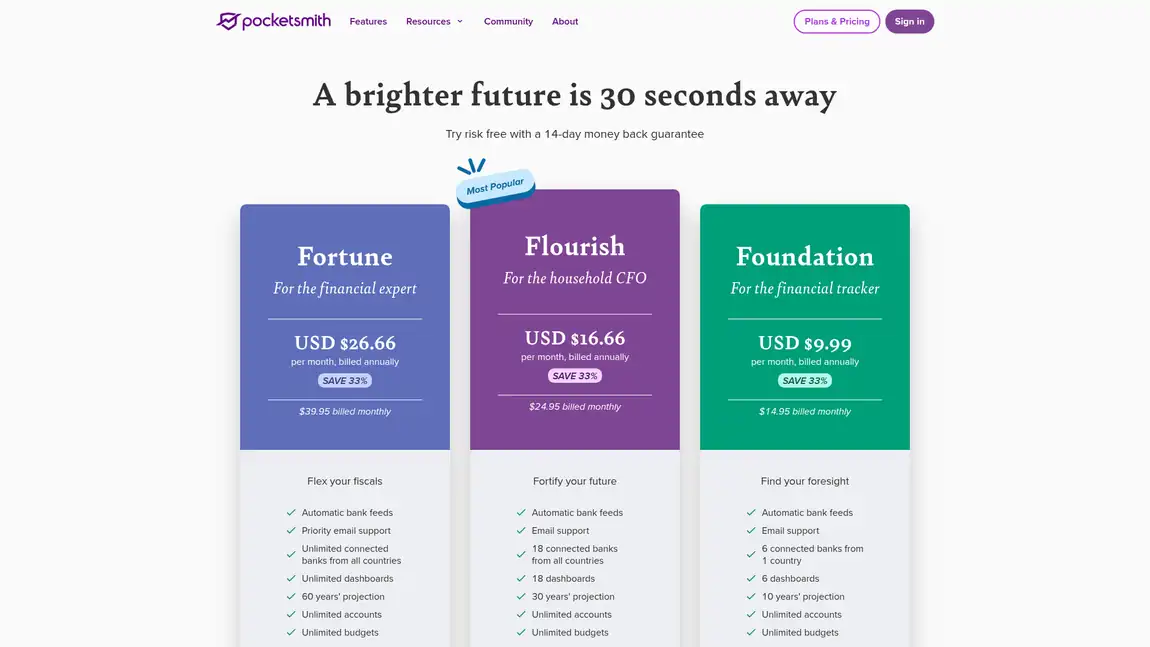
Source: PocketSmith pricing page (pocketsmith.com/pricing), captured 20 Oct 2026
There is no advertised free trial on paid plans. Instead, if you cancel within 14 days of a purchase, PocketSmith will refund that payment in full on request. After 14 days, monthly subscriptions are not refunded, while quarterly and annual subscriptions can be refunded for the remaining full months. When we checked, signing up through our link also applied an offer of 50% off a monthly Foundation subscription for the first two months. For every current saving, see our PocketSmith coupon code guide.
PocketSmith Pros and Cons
Pros
- Long-range daily balance forecasts (up to 60 years) with what-if scenarios
- Calendar-based budgeting with flexible periods, rollover and Safe Balance
- Strong multi-currency support and bank connections in many countries
- Ad-free, with encryption and two-factor authentication on every plan
- Collaborator access, document storage and optional AI assistant integration
Cons
- No free trial of paid plans, only a 14-day money-back guarantee
- Foundation connects banks from just one country
- Costs more than basic or ad-supported budgeting apps
- The depth of features takes time to set up well, so it suits people willing to tinker
Also Read:
- PocketSmith Coupon Code: Current Ways to Save
- TransferWise (Wise) Review
- Motley Fool Review: Is the Investing Advice Worth It?
PocketSmith Review FAQs
Is PocketSmith free?
Yes. PocketSmith has a Free plan with 2 accounts, 12 budgets, 2 dashboards and a 6-month cash flow projection, built around manual imports. Connected bank feeds, longer forecasts and unlimited budgets need Foundation, Flourish or Fortune.
How much does PocketSmith cost per year?
On annual billing PocketSmith Foundation is $9.99/month, Flourish $16.66/month and Fortune $26.66/month, about $120, $200 and $320 a year in USD. Paying monthly costs $14.95, $24.95 and $39.95, so annual billing saves 33%.
Does PocketSmith have a free trial of its paid plans?
PocketSmith does not advertise a free trial for paid plans. Instead it offers a 14-day money-back guarantee: cancel within 14 days of a purchase and you can ask support for a full refund of that payment.
How far ahead can PocketSmith forecast my balance?
PocketSmith projects daily bank balances 6 months ahead on Free, 10 years on Foundation, 30 years on Flourish and 60 years on Fortune, based on the budgets and scheduled events you add to its calendar.
Can PocketSmith handle accounts in different countries and currencies?
Yes. PocketSmith converts foreign accounts using daily exchange rates, and Flourish and Fortune can connect banks from any country. Foundation is limited to 6 connected banks from a single country.
Is PocketSmith a good Mint replacement?
PocketSmith is a strong option for former Mint users who want forecasting, and it offers an Express Migration tool to bring over accounts, transactions and categories. It costs more than ad-supported apps, but it is ad-free and earns money from subscriptions rather than your data.
Conclusion: PocketSmith Review 2026
PocketSmith is not the cheapest budgeting app, but it does something most of them do not: it turns your budget into a day-by-day forecast you can test before you act. Start on the Free plan to see whether the calendar approach clicks, then move to Foundation if you bank in one country or Flourish if you need multiple countries and longer forecasts. If you are also building long-term wealth, pair it with research like our Motley Fool review. With annual billing saving 33% and a 14-day refund window, trying a paid plan carries little risk.
