How to Get the DocuSign Discount (Step by Step)
DocuSign doesn’t have a public coupon code running right now, so there’s nothing to paste at checkout. The real saving comes from the billing option you choose. Here’s how to claim it:
Step 1: Click any “Get Deal” card above or the button below to open DocuSign’s eSignature plans page.
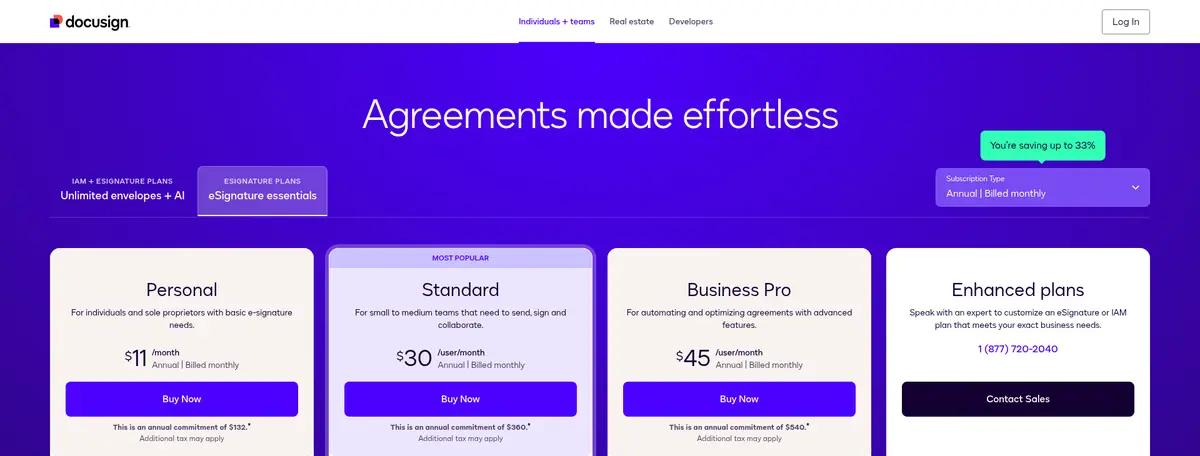
Step 2: Open the Subscription Type menu and pick an annual option. Paying for the full year upfront gives the lowest price; “Annual | Billed monthly” keeps the yearly commitment but spreads the payments out.
Step 3: Choose Personal (one user, 5 envelopes a month), Standard (teams, shared templates and branding) or Business Pro (web forms, payments and bulk send), then set the number of users.
Step 4: Check the total at checkout, including tax, and pay. If you’re not sure yet, start with the free trial first; it doesn’t ask for a card.
Personal
Personal is for freelancers and sole proprietors who send only a few documents. It includes 5 envelopes a month, reusable templates, an AI-assisted agreement summary and 1,000+ integrations. Paid upfront it costs $120 a year, against $180 a year on monthly billing.
Standard
Standard is the plan DocuSign marks as most popular. It adds shared templates, real-time commenting, your own branding, delegated signing and in-person signing for teams of up to 50 users. Paying yearly upfront brings it to $25 per user a month instead of $45, which is the 44% saving.
Business Pro
Business Pro adds mobile-friendly web forms, payment collection during signing, drop-down and radio form fields, signer attachments, PowerForms and bulk sending. It costs $40 per user a month paid upfront, compared with $65 on monthly billing.
Other Ways to Save on DocuSign
- Nonprofits: DocuSign's special offers page lists savings of up to 70% on e-signature and AI-enhanced plans for nonprofit organizations.
- Students and teachers: the same page offers a free option for signing, returning and storing permission slips and school forms.
- Real estate agents: DocuSign sells dedicated real estate plans with pre-tagged state and local forms, and NAR members get an extra 20% off.
- Free trial: you can try eSignature for free with only an email address; DocuSign says no credit card is required.
- Watch for limited-time codes: DocuSign occasionally runs promo codes for new customers. The most recent one, TRUST25, took an extra 25% off the first year of some annual plans and ended on October 23, 2026. DocuSign also says it sends promotional discounts by email from time to time.
DocuSign Refund Policy
DocuSign gives a refund on annual eSignature plans bought on its website (Personal, Standard and Business Pro, among others) if you ask within 30 days of purchase, and you can use that refund only once. On the “Annual | Billed monthly” option you can cancel without penalty within 30 days; after that you owe the rest of the year. Monthly plans can be cancelled at any time, and you won’t be charged for the next month.
Is DocuSign Worth It?
DocuSign is worth paying for if you send contracts, offer letters or client agreements regularly and want signers to sign without creating an account. Personal is enough for a solo business sending a handful of documents a month. Teams should go straight to Standard on annual billing, since the monthly version caps each user at 10 envelopes a month. If e-signatures are only one part of your sales process, our HubSpot CRM review and our roundup of marketing automation software for small business cover the tools that usually sit around it.
DocuSign Coupon FAQs
Does DocuSign have a working coupon code right now?
Not a public one. DocuSign's TRUST25 code (an extra 25% off the first year of some annual plans for new customers) expired on October 23, 2026. The savings that are live now are annual billing, up to 44% off, plus the nonprofit and education offers on DocuSign's special offers page.
How much does DocuSign eSignature cost?
In the US, Personal is $15 a month on monthly billing, Standard is $45 per user a month and Business Pro is $65 per user a month. Paying for a full year upfront drops them to $10, $25 and $40 a month, and the annual plan billed monthly costs $11, $30 and $45.
Is there a DocuSign free trial?
Yes. DocuSign's trial page lets you try eSignature for free with just an email address, and it says no credit card is required.
Does DocuSign offer nonprofit or student discounts?
DocuSign's special offers page lists savings of up to 70% for nonprofits and a free plan for students and teachers to sign and store school forms. Real estate agents get dedicated plans, with an extra 20% off for NAR members.
Can I get a refund on a DocuSign plan?
DocuSign refunds annual eSignature plans bought on its website if you ask within 30 days of purchase, and the refund can be used only once per customer. Monthly plans can be cancelled at any time, and you are not charged for the next month.
How many envelopes do DocuSign plans include?
Personal includes 5 envelopes a month. Standard and Business Pro annual plans include up to 100 envelopes per user per year, and their monthly versions include up to 10 per user per month. Extra envelopes are billed pay-as-you-go.
Conclusion: DocuSign Coupon Codes & Discounts 2026
There’s no public DocuSign coupon code live right now, and the old “55% off” codes you’ll see around the web aren’t on DocuSign’s site. The real discount is annual billing: Personal at $120 a year, Standard at $25 per user a month or Business Pro at $40 per user a month, up to 44% less than paying monthly. Nonprofits can save up to 70%, students and teachers can use it for free, and anyone can test it with the no-card free trial first.
If you are looking for similar deals, check out these posts:
