How to Get the Podia Yearly Discount
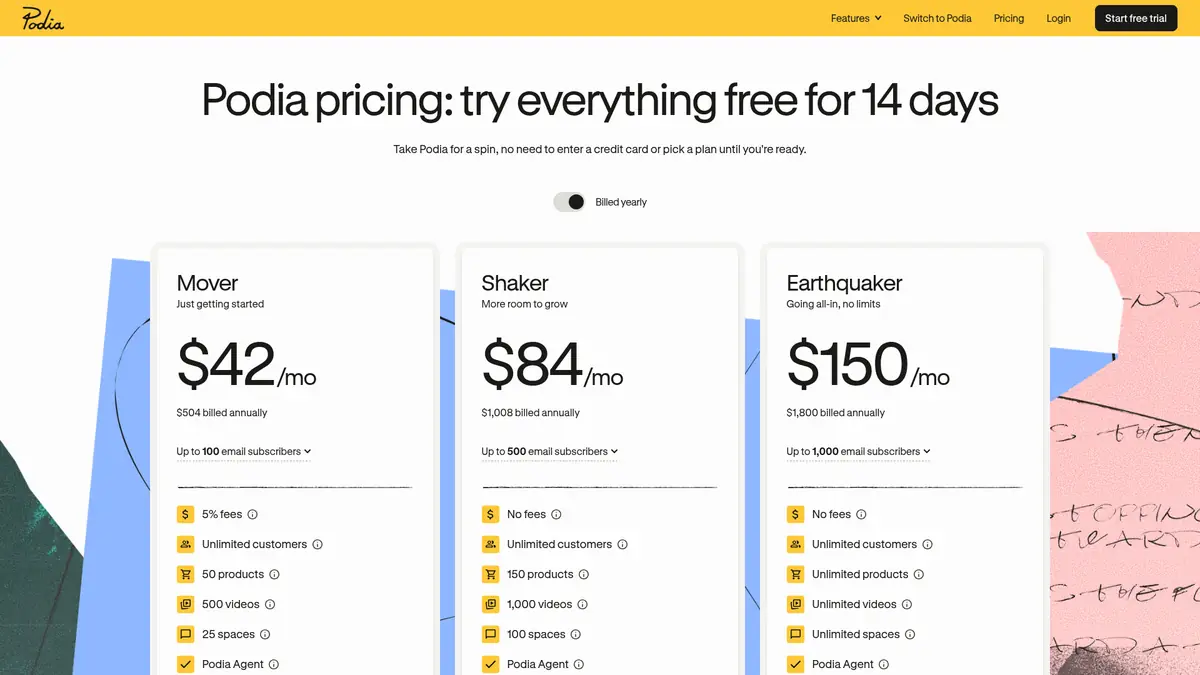
Podia has no promo code box to fill in. The discount is applied automatically when you pick yearly billing, and you can try the platform free first. Here is how:
Step #1: Go to Podia and click “Start free trial”. You don’t need a credit card or a plan to sign up.
Step #2: Use the 14-day trial to build your course, download or community. The trial includes upsells, PayPal, affiliates and email for up to 100 subscribers.
Step #3: When you’re ready, open your account settings, choose a plan and select yearly billing. That is where the 14% to 16% saving comes from.
Step #4: Add your payment method to confirm. Upgrades take effect immediately, and if you start on monthly billing you can switch to yearly at any time.
Other Ways to Save on Podia
- 14-day free trial: Try every feature without a card, so you only pay once you know Podia fits.
- Free migration: Podia’s team moves your courses, downloads, customers and email lists for free, up to 50 products on Mover and 150 on Shaker or Earthquaker.
- Refer-a-friend credit: Existing customers earn a US$30 account credit for each referred creator who becomes a paying customer. Credits land on the 1st of the month, at least 30 days after the referral converts.
- Pick the right plan: On Mover, the 5% fee is the hidden cost. If your sales are growing, Shaker’s zero-fee pricing can be cheaper overall.
Older coupon pages, including an earlier version of this one, advertised a free Podia plan and “55% off” yearly pricing. Neither appears on Podia’s site today, so we removed them.
Is Podia Worth It?
Podia suits solo creators who want courses, downloads, coaching, a community, email and a website in one place without stitching tools together. Over 15,000 creators use it, according to Podia’s pricing page. Our Podia review covers the features in more depth, and if you’re comparing it with a bigger platform, read Podia vs Kajabi. Still shopping around? See our list of Podia alternatives.
Also Read:
Podia Coupon FAQs
Does Podia have a working coupon code?
Podia does not publish any promo codes on its own site or help center, so we don't list one. The real saving is yearly billing, which cuts every plan by about 14% to 16% compared with paying month to month.
How much do you save with Podia yearly billing?
Yearly billing saves US$84 a year on Mover, US$180 on Shaker and US$348 on Earthquaker. You can switch from monthly to annual billing at any time and the change starts immediately.
Does Podia still have a free plan?
No. Podia's pricing page now lists only the paid Mover, Shaker and Earthquaker plans. You can use everything free for 14 days without entering a credit card, then you need a paid plan to keep selling.
Can I get a refund from Podia?
Podia refunds a payment if you message support within 72 hours of your most recent charge. It does not give partial refunds on annual plans, and refunds take 5 to 10 business days to arrive.
Does Podia offer a nonprofit or student discount?
Podia's help center says it does not currently offer nonprofit discounts, and we found no student discount on its site. Existing customers can earn a US$30 account credit for each friend they refer who becomes a paying customer.
Which Podia plan has no transaction fees?
Shaker and Earthquaker have no Podia transaction fees, while Mover charges 5% per sale. Stripe or PayPal still charge their own processing fee, typically 2.9% plus 30 cents.
Conclusion: Podia Coupon Code 2026
There is no verified Podia coupon code right now, but yearly billing is a real, guaranteed saving: US$84 a year on Mover, US$180 on Shaker and US$348 on Earthquaker. Start with the free 14-day trial, build your first product, and switch to yearly billing once you’ve picked your plan. If you sell regularly, compare Mover’s 5% fee with Shaker’s price before you decide.
