WP Engine and Flywheel are owned by the same company, so the hosting underneath is similar. The differences are price, bandwidth, how far each plan family scales, and Flywheel’s client-workflow tools. Prices below were checked on the official sites on 19 Oct 2026.
WP Engine Check out
|
Flywheel Check out
|
|---|---|
| $28/mo | $25/mo |
Best for growing business sites that want more bandwidth, a 3-site plan and an upgrade path to isolated resources, phone support and a 99.99% uptime SLA. |
Best for freelancers, designers and small agencies who want the lowest price per site plus Blueprints, collaborators and billing transfer to clients. |
|
|
|
|
|
|
| Check out | Check out |
If you’re choosing between WP Engine and Flywheel, you’re really choosing between two products from the same company. WP Engine bought Flywheel in 2019, and both still sell managed WordPress hosting under their own names, with their own dashboards, plans and support teams.
The short answer for WP Engine vs Flywheel: Flywheel is a little cheaper at every like-for-like tier (its single-site Starter plan is $25/month billed yearly against $28/month for WP Engine’s 1-site Essential plan), and its tools are built around designers and freelancers handing sites to clients. WP Engine gives you more bandwidth per tier, a 3-site option, and a clear upgrade path to isolated servers, phone support and an uptime SLA. Below I compare current pricing, features and policies, all checked on the official sites on 19 Oct 2026.
Pre-Verdict: Which One Should You Pick?
Pick Flywheel if you’re a freelancer, designer or small agency who wants the lowest price per site, a friendly dashboard, and workflow extras like Blueprints, collaborators and billing transfer to clients.
Pick WP Engine if you run a business site you expect to grow, need a 3-site plan, want more bandwidth headroom, or think you’ll eventually need isolated resources, phone support and a 99.99% uptime SLA (WP Engine’s Business plan).
For most growing business sites I’d lean towards WP Engine because of that upgrade path; for client-site builders on a budget, Flywheel is the better deal.
What Is WP Engine?
WP Engine is a managed WordPress host that handles WordPress, PHP and MySQL updates, backups and security for you. Its self-serve plan is called Essential, sold in 1, 3, 10 and 30-site sizes. Above that sit Business (from $400/month billed annually) and custom Enterprise plans.
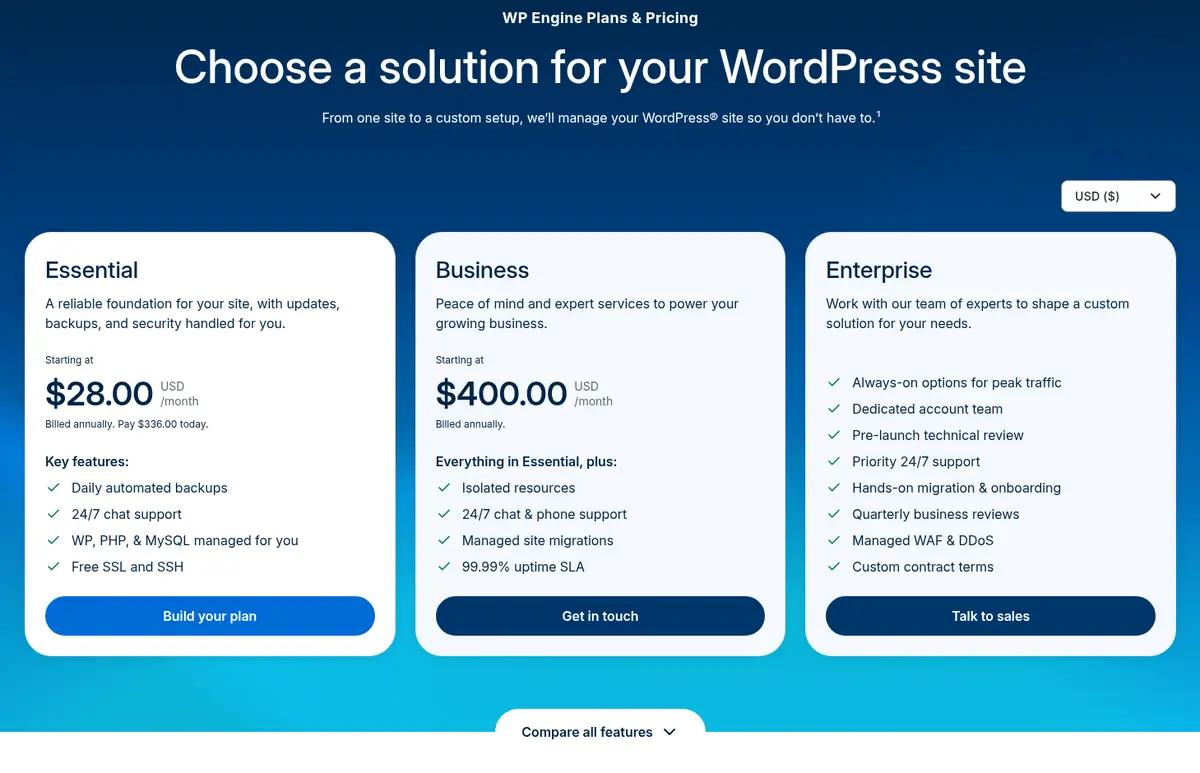
Source: WP Engine plans page, captured 19 Oct 2026
Every Essential plan includes daily automated backups, 24/7 chat support, free SSL and SSH access, EverCache caching, a Cloudflare-powered global CDN, one-click staging and development environments, transferable sites, 10 premium themes and Genesis Blocks. Essential runs on a shared environment; automatic plugin updates, uptime monitoring, NitroPack front-end optimisation and an advanced WAF are paid add-ons.
What Is Flywheel?
Flywheel is WP Engine’s sister brand aimed at designers, freelancers and agencies. It sells three fixed plans (Starter, Freelance and Agency) plus custom plans for 30+ sites.
All plans include FlyCache, a CDN powered by Fastly, free SSL, nightly backups kept for 30 days, staging sites, free migrations, 24/7 chat support, 10 StudioPress themes with the Genesis Framework, and Plugin Security Alerts. Flywheel’s standout extras are workflow tools: Blueprints (save a theme and plugin setup to reuse), Organizations for teams, collaborators on single sites, billing transfer to hand a site and its bill to a client, site cloning, an SSH Gateway, and the free Local development app.
WP Engine vs Flywheel: Differences and Similarities
| Feature | WP Engine (Essential) | Flywheel |
|---|---|---|
| Owner | WP Engine | WP Engine |
| Cheapest plan (annual) | $28/mo, 1 site | $25/mo, 1 site |
| Monthly billing, 1 site | $35/mo | $30/mo |
| Plan sizes | 1, 3, 10, 30 sites | 1, 10, 30 sites (+ add-on sites at $20/mo) |
| Bandwidth on 1-site plan | 75GB | 50GB |
| CDN | Cloudflare-powered | Fastly |
| Backups | Daily automated + on-demand | Nightly, kept 30 days |
| Support | 24/7 chat (phone on Business) | 24/7 chat |
| Uptime SLA | 99.99% on Business and Enterprise only | Not listed on plans page |
| Client hand-off tools | Transferable sites | Billing transfer, Blueprints, collaborators |
| Free migrations | Managed migrations listed on Business | Free migrations on all plans |
| Email hosting | Not included | Not offered |
| Published money-back guarantee | Not stated on current plans page | 60 days (Starter, most Freelance) |
The core hosting is similar: both are managed WordPress platforms with staging, SSL, CDN, backups and the same StudioPress/Genesis theme family. The real differences are price, bandwidth, how far each plan family can scale, and Flywheel’s client-workflow extras.
Pricing Plans: WP Engine vs Flywheel
Here’s how the self-serve plans line up, in USD. WP Engine’s annual billing saves 20% against monthly; Flywheel’s annual billing gives you two months free.
| Sites | WP Engine Essential (annual) | WP Engine (monthly) | Flywheel (annual) | Flywheel (monthly) |
|---|---|---|---|---|
| 1 site | $336/yr ($28/mo) · 25k visits, 10GB, 75GB bandwidth | $35/mo | Starter $300/yr ($25/mo) · 25k visits, 10GB, 50GB bandwidth | $30/mo |
| 3 sites | $624/yr ($52/mo) · 75k visits, 15GB, 150GB bandwidth | $65/mo | No 3-site plan | — |
| 10 sites | $1,248/yr ($104/mo) · 100k visits, 20GB, 240GB bandwidth | $130/mo | Freelance $1,150/yr ($96/mo) · 100k visits, 20GB, 200GB bandwidth | $115/mo |
| 30 sites | $3,168/yr ($264/mo) · 400k visits, 50GB, 550GB bandwidth | $330/mo | Agency $2,900/yr ($242/mo) · 400k visits, 50GB, 500GB bandwidth | $290/mo |
Prices checked on 19 Oct 2026 from wpengine.com/plans and getflywheel.com/pricing.
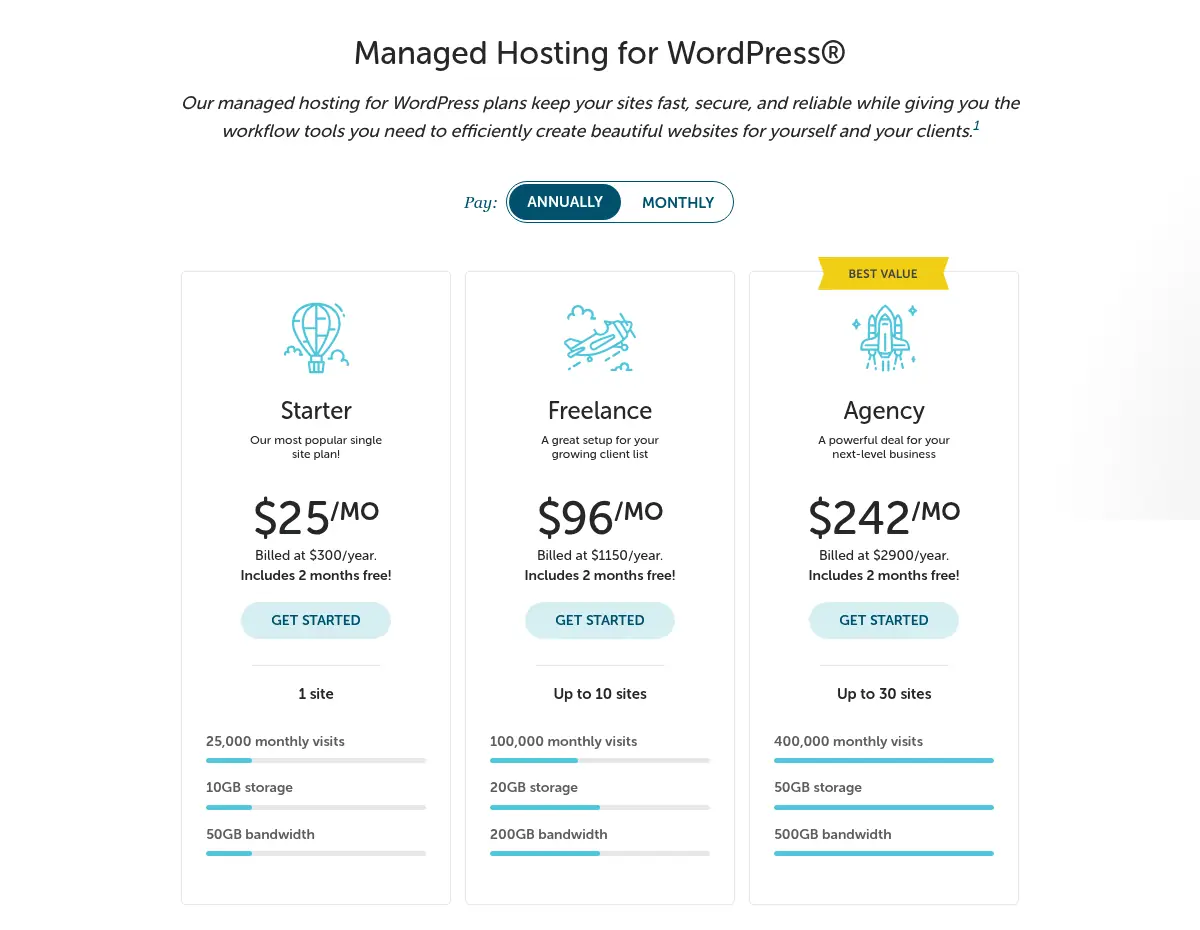
Source: Flywheel pricing page, captured 19 Oct 2026
A few things the tables don’t show:
- WP Engine’s annual prices are first-year pricing for new Essential customers. Its offer terms say the deal can’t be combined with other offers and renewal pricing is subject to change, so budget for a higher bill in year two. If you want the current first-year discount details, see my WP Engine coupon code guide.
- Flywheel charges overages instead of throttling: $1 per 1,000 visits over your plan and $1 per GB of storage over your limit. WP Engine’s checkout notes that overages may apply but doesn’t list the rates on the plans page.
- Extra sites on Flywheel cost $20/month or $200/year each, which helps if you sit between plan sizes. WP Engine fills that gap with its 3-site tier.
- Refunds: Flywheel offers a 60-day money-back guarantee on new Starter plans and Freelance plans without custom onboarding; Agency and Custom plans, upgrades and renewals are excluded. WP Engine’s current plans page doesn’t state a refund window, so ask sales before you buy.
If you’re also weighing other managed hosts, my Pressable vs WP Engine comparison, WP Engine vs SiteGround breakdown and Nexcess review cover the closest alternatives.
WP Engine vs Flywheel FAQs
Does WP Engine own Flywheel?
Yes. WP Engine acquired Flywheel in 2019, and Flywheel's site is copyrighted to WPEngine, Inc. Flywheel still runs as its own product with separate plans, pricing, dashboard and support.
Is Flywheel cheaper than WP Engine?
Yes, at comparable sizes. On annual billing Flywheel Starter is $25/mo vs $28/mo for WP Engine's 1-site Essential plan, Freelance is $1,150/yr vs $1,248/yr for 10 sites, and Agency is $2,900/yr vs $3,168/yr for 30 sites. WP Engine includes more bandwidth at each size.
Do WP Engine and Flywheel offer a money-back guarantee?
Flywheel publishes a 60-day money-back guarantee for new Starter plans and Freelance plans without custom onboarding, excluding Agency and Custom plans. WP Engine's current plans page does not state a refund window, so confirm the terms with WP Engine sales before buying.
Which is better for agencies, WP Engine or Flywheel?
Flywheel suits small agencies and freelancers thanks to Blueprints, Organizations, collaborators and billing transfer to clients. WP Engine suits agencies whose clients need isolated resources, phone support or a 99.99% uptime SLA, which come with its Business plan.
Does Flywheel or WP Engine charge overages?
Flywheel charges $1 per 1,000 visits above your plan and $1 per GB of extra storage rather than throttling your site. WP Engine says overages may apply at checkout but does not list its overage rates on the plans page.
Do WP Engine or Flywheel include email hosting?
No. Flywheel states it does not offer email accounts and recommends a separate provider such as Google Workspace, and WP Engine's plan comparison lists no email hosting, so budget for an email service with either host.
Final Thoughts: WP Engine vs Flywheel 2026
Because both hosts belong to WP Engine, you won’t go wrong on the underlying hosting. Choose Flywheel if you want the lower price per site and you build sites for clients: the billing transfer, Blueprints and collaborator tools save real time. Choose WP Engine if your site is a growing business asset: you get more bandwidth, a 3-site tier, and a straight path to Business-level isolated resources, phone support and an uptime SLA.
Either way, compare the renewal price, not just the first-year price, before you commit.
