If your WordPress pages feel slow because of heavy images, ShortPixel is one of the easiest fixes: install the plugin, paste an API key, and it compresses new uploads automatically and bulk-optimizes the rest of your library. It is free for 100 images a month, and when I rechecked the official pricing page on 11 November 2026, unlimited optimization cost $8.33 a month on yearly billing.
This ShortPixel review covers what the plugin does today, how its compression levels and WebP/AVIF conversion work, the real prices and refund rules, and who should pay for it versus sticking with the free plan.
What Is ShortPixel?
ShortPixel is an image optimization service with a WordPress plugin, ShortPixel Image Optimizer. The plugin sends your images to ShortPixel’s servers, compresses them, and replaces the files in your media library while optionally keeping a backup of each original. It also works outside WordPress through an API, a web app and integrations for other platforms.
The same company makes ShortPixel Adaptive Images, a separate plugin that resizes and serves images from a CDN on the fly. This review focuses on the main Image Optimizer plugin; if you want the CDN route, see our ShortPixel Adaptive Images review.
Key Features of ShortPixel
Three compression levels plus SmartCompress
Lossy gives the smallest files and is the right choice for most blogs. Glossy keeps more detail, which suits photographers and stores with product photos. Lossless keeps every pixel. ShortPixel’s SmartCompress setting aims for the same visual quality at the smallest possible file size.
WebP and AVIF conversion
The plugin can create WebP and AVIF copies next to your original JPEG and PNG files and deliver them to browsers that support them. It can also turn animated GIFs into animated WebP or MP4, and convert PNG, BMP and TIFF files to JPEG when that saves more space.
Bulk optimization and per-thumbnail control
Bulk Optimization processes the existing media library in one run, including next-gen versions. You choose exactly which WordPress thumbnail sizes get optimized, which matters because every size uses a credit. Regex exclusions let you skip files or folders you want left alone.
Backups and one-click restore
With backups on, originals are stored on your own server, so you can restore an image or re-optimize it at a different level later. The trade-off is disk space: a large library roughly doubles in size while backups are kept.
PDFs and folders outside the media library
ShortPixel optimizes PDF files as well as JPEG, PNG and GIF, and it can optimize images in custom folders such as theme or gallery directories, not only the media library.
Built for developers and agencies
The plugin supports WP-CLI for scheduled and bulk jobs, WordPress multisite, WP Offload Media and WPML. Agencies can create API key aliases per client, and a Cloudflare token can be added so updated images are purged automatically. Support is listed as 24/7/365 on every plan.
ShortPixel Pricing
Prices below were checked on shortpixel.com/pricing on 11 November 2026 and are in US dollars.
| Plan | Price | Credits | Best for |
|---|---|---|---|
| Free | $0 | 100 per month | Testing or very small sites |
| Unlimited | $10.99/mo or $99.90/yr ($8.33/mo) | Unlimited, 100 AI credits/mo, unlimited sites | Sites that add images every week |
| Unlimited AI | $15.99/mo or $159.90/yr ($13.33/mo) | Unlimited, plus unlimited AI alt text, background removal and upscaling | Stores and agencies using the AI tools |
| One-time 30K / 50K | $19.99 / $29.99 | 30,000 / 50,000, never expire | One-off backlog on a small site |
| One-time 100K / 250K | $49.99 / $99 | 100,000 / 250,000, never expire | Large libraries optimized once |
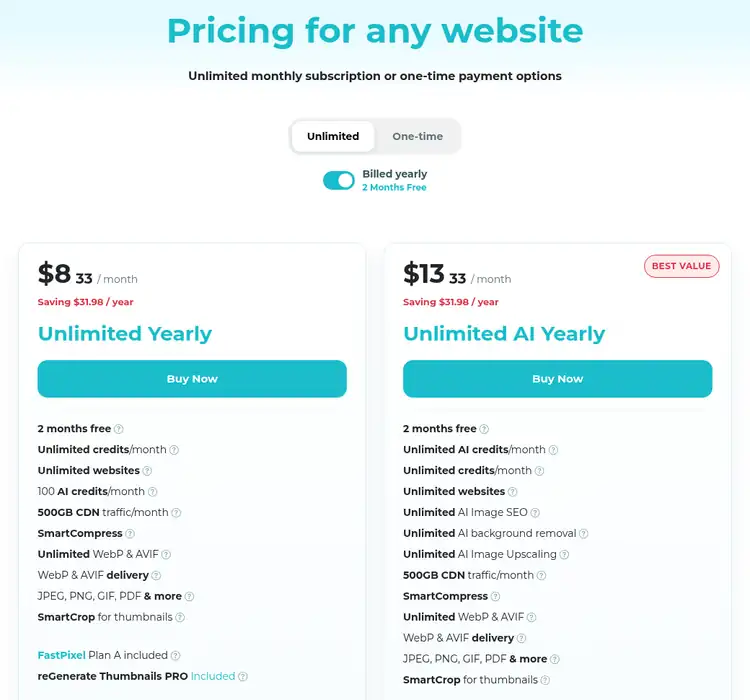
Source: ShortPixel pricing page, captured 11 Nov 2026
Yearly billing saves $31.98 on either Unlimited plan, which is the same as two months free. Subscription credits reset every 30 days, while one-time credits never expire. ShortPixel does not publish public coupon codes; our ShortPixel coupon guide covers the real ways to save, and the ShortPixel lifetime deal post explains why lifetime plans are only sold through third parties.
Refunds: ShortPixel’s terms allow a refund within 14 days of purchase if you have used no more than 20% of the quota. Yearly plans have a 60-day window, but only if no more than 5% of the current cycle’s quota has been used.
ShortPixel Pros and Cons
Pros
- A genuinely useful free plan with 100 credits every month
- Lossy, Glossy and Lossless options cover blogs, stores and photographers
- WebP and AVIF creation and delivery on every plan
- One-time credits never expire, so you are not forced into a subscription
- Unlimited plans work on unlimited websites, which suits agencies
Cons
- Every thumbnail size uses a credit, so free credits go fast on themes with many sizes
- Backups of originals take up server disk space
- Subscription credits expire after 30 days instead of rolling over
- The AI features need the pricier Unlimited AI plan for unlimited use
Who Should Use ShortPixel?
ShortPixel fits bloggers and store owners who want image compression to run in the background without thinking about it, photographers who need the Glossy level, and agencies managing many client sites on one account. If you only publish a few posts a month, the free plan or a single one-time package will probably cover you for a long time.
Still comparing plugins? Read our ShortPixel vs Imagify and ShortPixel vs Smush comparisons before you decide.
ShortPixel Review FAQs
Is ShortPixel free to use?
Yes. A free ShortPixel account gets 100 image credits every month, which is enough to test the plugin on a small site. Free credits reset every 30 days and do not roll over.
How much does ShortPixel cost?
ShortPixel Unlimited costs $10.99 a month or $99.90 a year ($8.33 a month). Unlimited AI costs $15.99 a month or $159.90 a year ($13.33 a month). One-time credit packages run from $19.99 for 30,000 credits to $99 for 250,000 credits.
Do ShortPixel credits expire?
Credits on monthly and yearly plans expire after 30 days and do not carry over. One-time credits you buy as a package never expire, so they suit a one-off bulk optimization job.
What is the ShortPixel refund policy?
ShortPixel's terms allow refunds within 14 days of purchase if no more than 20% of the purchased quota has been used. Yearly plans can be refunded within 60 days if no more than 5% of the current cycle's quota has been used.
Does ShortPixel convert images to WebP and AVIF?
Yes. Every plan, including free, can create WebP and AVIF versions alongside your originals and deliver them to browsers that support them. Paid Unlimited plans include unlimited WebP and AVIF conversions.
Can I restore original images after ShortPixel compresses them?
Yes, if backups are enabled in the plugin settings. ShortPixel keeps the originals in a backup folder on your server, so you can restore a single image or the whole library, but the backups use extra disk space.
Conclusion: ShortPixel Review 2026
ShortPixel is still one of the safest picks for WordPress image optimization. Setup takes a few minutes, compression quality is configurable, WebP and AVIF are included on every plan, and you can choose between a flat yearly price ($99.90 for unlimited) and one-time credits that never expire. The main things to watch are credit use on extra thumbnail sizes and the disk space backups take.
Start with the free 100 monthly credits, see how many your site actually uses, then upgrade to the plan that matches how often you add images.
