How to Claim the WP Engine Coupon in October 2026
You don’t need to hunt for a hidden code. WP Engine applies its first-year discount on its own pricing page, so claiming it takes a few minutes.
Step #1: Open the WP Engine plans page
Go to the official WP Engine pricing page and choose the Managed Hosting Platform.
Step #2: Switch billing to Annual
The 20% saving only applies to annual billing on the Essential plan. Monthly billing is charged at the regular price.
Step #3: Pick your capacity
Choose 1, 3, 10 or 30 sites based on how many WordPress sites and monthly visits you expect. WP Engine lets you add extra sites later for $20 per site per month.
Step #4: Check the cart summary
Before paying, make sure the cart shows a discount line. When I checked, it read WPE20YEARONE. If it’s missing, you’re probably on monthly billing or looking at Core or Enterprise, which the offer doesn’t cover.
Step #5: Create your account and pay
Enter your details and payment information to finish checkout. The discounted first year is charged upfront.
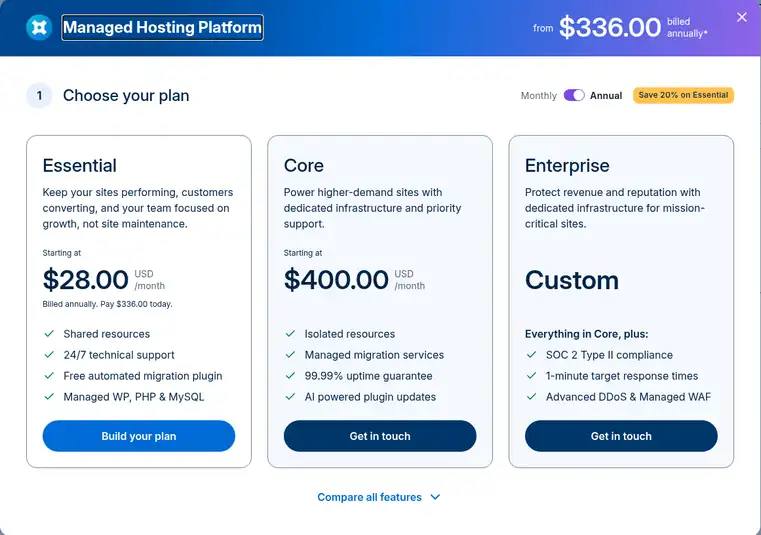
What You Get With WP Engine Essential
Even the entry plan is fully managed, which is what you’re paying the premium for:
- Managed WordPress, PHP and MySQL: core updates, security patching and plugin risk scans are handled for you.
- Automatic and on-demand backups: WP Engine keeps backups for at least 30 days.
- EverCache and a global CDN: WordPress-tuned caching plus a CDN powered by Cloudflare.
- 1-click staging and dev environments: test changes on a copy before pushing them live.
- Auto-renewing SSL and SSH access on every plan.
- 10 premium themes and Genesis Blocks for building pages quickly.
- 24/7 technical support and a free automated migration plugin.
A few extras cost more on Essential. Automatic plugin updates (Smart Plugin Manager), uptime monitoring and NitroPack speed optimization are paid add-ons there, while Core includes one license of each. Advanced DDoS protection and the managed WAF are add-ons on every tier.
Still choosing a host? Our WP Engine vs SiteGround and WP Engine vs Bluehost comparisons show where managed hosting earns its higher price.
Is the WP Engine Discount Worth It?
If you were going to pay annually anyway, yes. On the 1-site plan you pay $336 for the first year instead of $420, a saving of $84 compared with twelve months at $35.
Keep the limits in mind. The discount covers your first year only, so budget for the regular price (currently $420 a year for 1 site) when you renew. It’s for new customers, can be redeemed once at signup, and can’t be combined with other offers or used on upgrades.
Also check the exit terms before you commit. WP Engine’s support docs say cancelling a plan needs 30 days’ notice through its cancellation form, and its terms of service say fees aren’t refundable except where the agreement states otherwise. I couldn’t find a money-back guarantee on WP Engine’s own site, so don’t count on one.
WP Engine costs more than budget shared hosts, so it fits business sites, stores and agencies that value managed updates, staging and fast support more than the lowest sticker price. If you’re weighing another premium managed host, see our Pressable vs WP Engine comparison.
WP Engine Coupon FAQs
Does WP Engine have a working coupon code?
Yes. When I checked on 11 October 2026, WP Engine automatically applied the code WPE20YEARONE on its pricing page, taking 20% off the first year of annual Essential plans for new customers. You don't have to type it in.
What is the cheapest way to pay for WP Engine?
The 1-site WP Engine Essential plan billed annually is the cheapest option at $336 for the first year, which works out to $28 a month. Paying monthly for the same plan costs $35 a month.
Does the WP Engine discount work on monthly billing?
No. WP Engine's 20% saving appears only when you choose annual billing on an Essential plan. Monthly Essential billing and the Core and Enterprise tiers are charged at their regular prices.
What does WP Engine cost after the first year?
WP Engine's first-year pricing covers year one only. After that the plan renews at the regular rate, currently $420 a year for 1-site Essential, and WP Engine says renewal pricing is subject to change.
Can I combine WP Engine coupons?
No. WP Engine's offer terms say the first-year coupon can't be used with other offers, can be redeemed only once at signup, and doesn't apply to upgrades, renewals or other products.
Does WP Engine offer refunds?
WP Engine's terms of service say fees are non-refundable except where the agreement says otherwise, and its support docs require 30 days' notice to cancel a plan. Read the current terms before buying if a refund matters to you.
Final Thoughts on WP Engine Coupon Discounts
There’s no secret WP Engine coupon worth chasing. The best deal is the official one: 20% off your first year when you choose an annual Essential plan, applied automatically at checkout.
That brings fully managed WordPress hosting, with backups, staging, a CDN and 24/7 support, down to $28 a month for the first year. Just plan for the regular price at renewal.
