How to Get the LiveChat Discount (October 2026)
LiveChat doesn’t publish promo codes, so there’s nothing to paste at checkout. The real savings come from the billing period you pick, and you claim them like this:
- Open the LiveChat website and click Sign up free. New sign-ups now land in Text, the newer product from the LiveChat team.
- Create your account with an email address or a Google, Apple, or Microsoft login. No credit card is asked for.
- Use the 14-day trial on Essential or Growth: add the chat widget to your site, invite teammates, and run real chats.
- Before the trial ends, open the subscription settings in the app, choose your plan, and switch billing to yearly. That’s where the up-to-24% saving is applied.
- Add your payment method. Your chats, settings, and widget carry over from the trial.
Because no card is collected upfront, nothing is charged automatically when the trial ends, so there’s nothing to cancel if you decide LiveChat isn’t for you.
LiveChat Is Now Text: What That Means for Your Discount
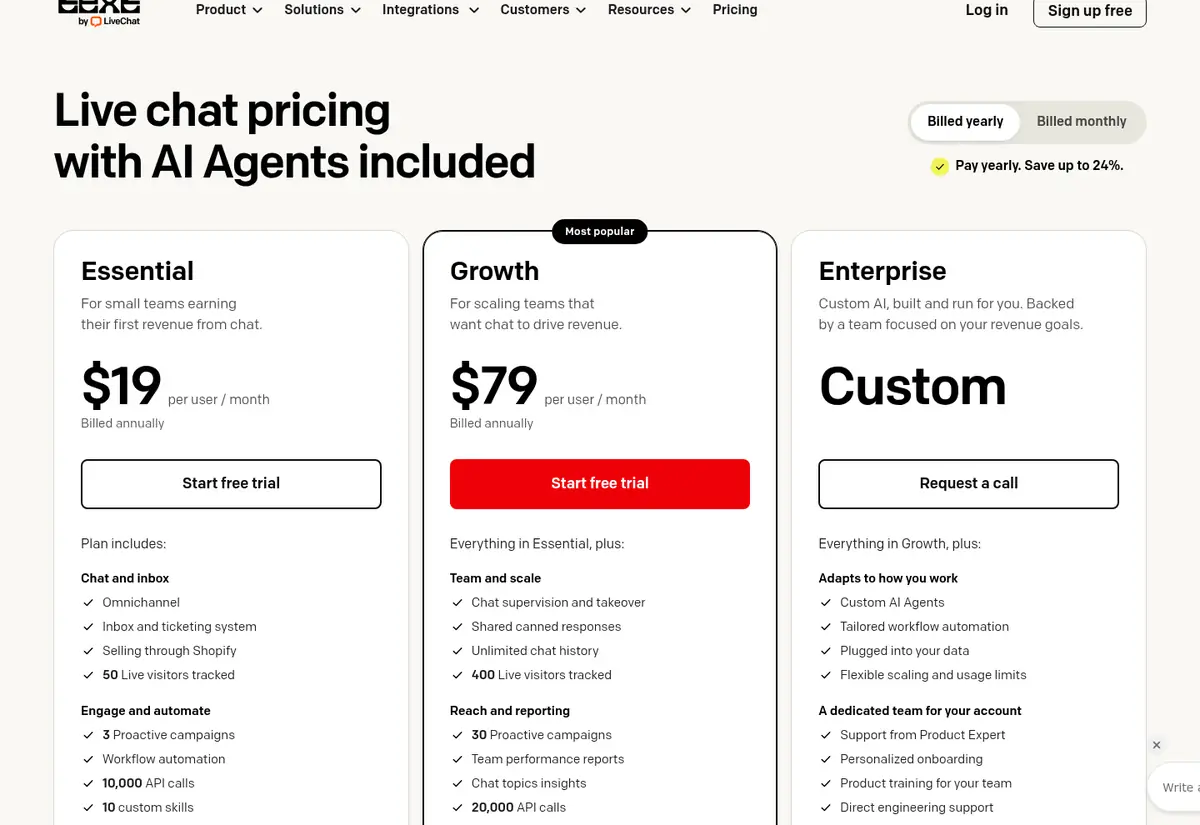
If you search for LiveChat today, you’ll end up on Text plans. LiveChat says Text is its next product: it keeps the live chat widget and adds a shared inbox, ticketing, and an AI Agent in one subscription. Existing LiveChat customers keep their current account, plan, price, and login, and their plans still sit on a separate legacy pricing page. Everything on this page, including the savings above, applies to new sign-ups.
That also explains why older “LiveChat coupon” pages don’t add up. Offers like a 30% first-payment code or a 60-day trial aren’t listed anywhere on LiveChat’s site, and the current trial is 14 days.
LiveChat for Nonprofits
LiveChat runs a nonprofit program for registered nonprofit organisations. Approved members get LiveChat free of charge under the program’s rules, and in return they publish a LiveChat for Nonprofits banner or link on their homepage. Businesses, political groups, religious organisations, government offices, and most schools and libraries aren’t eligible. You apply through the form on the LiveChat for Nonprofits page.
Separately, the pricing FAQ says nonprofits and educational institutions can ask the sales team about additional discounts before choosing a plan. There’s no published percentage, so get the offer in writing before you pay.
Who LiveChat Is a Good Fit For
- Online stores: the Shopify integration shows the live catalog and the visitor’s cart inside the chat, and the AI Agent can answer product questions and recover carts. If you’re working on conversion, pair it with our guide to increasing Shopify store sales.
- Support teams that also handle email: tickets, chats, and messages from Messenger, SMS (via Twilio), and in-app chat land in one inbox.
- Teams that measure service: reporting covers chat and ticket metrics, a visitor funnel report, and AI Agent sales reports. Our post on tracking customer service as an eCommerce brand covers which numbers to watch.
- Solo founders: there’s no minimum team size, so one person can run Essential at $19 a month on annual billing.
If you mostly need a free chat box and never answer tickets, the per-user price adds up quickly, so use the trial to check that you’ll actually use the inbox and AI features.
Also Read:
- How to Attract Customers to Your Online Store
- How to Track Customer Service as an eCommerce Brand
- How To Increase Sales On Your Shopify Store
LiveChat Coupon FAQs
Is there a working LiveChat coupon code?
No. LiveChat doesn't publish promo codes on its site. The verified ways to pay less are annual billing (about 24% off Essential and about 20% off Growth), the 14-day free trial, and the nonprofit program.
How much does LiveChat cost now?
New LiveChat sign-ups get the Text plans: Essential is $25 per user per month billed monthly or $19 billed yearly ($228 a year), and Growth is $99 monthly or $79 billed yearly ($948 a year). Enterprise is a custom quote.
Does the LiveChat free trial need a credit card?
No. The LiveChat trial runs for 14 days on Essential and Growth without a card, so you're never charged automatically when it ends. You add payment details only when you choose a plan.
Can nonprofits use LiveChat for free?
Registered nonprofits can apply to the LiveChat for Nonprofits program, which gives approved members LiveChat free of charge if they publish a LiveChat banner or link on their homepage. Churches, schools, government offices, and business associations aren't eligible.
Why does LiveChat's pricing page show Text plans?
LiveChat moved pricing for new trials to Text, its newer product that combines live chat, a shared inbox, ticketing, and an AI Agent. Existing LiveChat customers keep their current plan and price.
Can I cancel a LiveChat subscription anytime?
Monthly LiveChat plans can be cancelled anytime with no long-term contract. Annual plans run for the 12 months you paid for and can be adjusted or cancelled at renewal.
Conclusion: Is the LiveChat Deal Worth It?
There’s no secret LiveChat coupon, and pages promising 30% or 50% off with a code are out of date. The honest deal is simple: try LiveChat free for 14 days without a card, then pay yearly to save about 24% on Essential or about 20% on Growth. For a small team that wants chat, tickets, and an AI Agent in one place, Essential at $19 per user a month is the sensible starting point; registered nonprofits should apply to the free program first.
