How to Claim Beaver Builder Coupons and Official Deals
Beaver Builder does not publish reusable public coupon codes. The official savings paths are the listed annual plan prices (from $89/year), a one-time 10% nonprofit or education discount (by request), seasonal sales announced by Beaver Builder, plus free ways to try the product before you buy.
Step #1: Open Beaver Builder pricing through our link
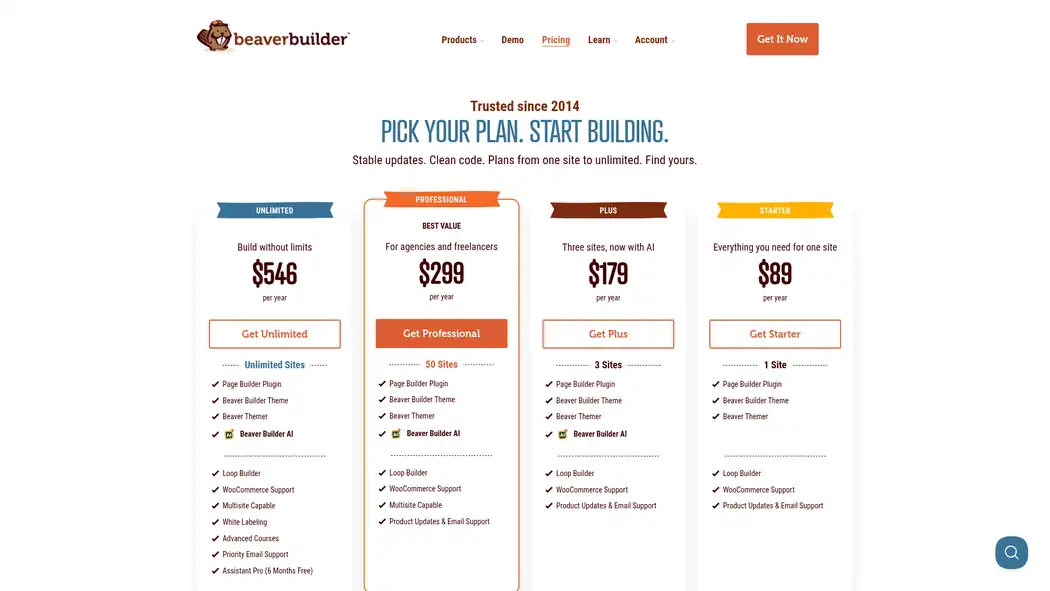
Visit the Beaver Builder pricing page using our referral link. You will land on the official site with all four current plans: Starter, Plus, Professional, and Unlimited.
Step #2: Pick the plan that matches your site count
Choose based on how many live sites you need: Starter (1), Plus (3), Professional (50), or Unlimited. Staging and development sites do not count toward the limit. Every paid plan includes the page builder, Beaver Builder Theme, and Beaver Themer.
Step #3: Click Get Starter / Plus / Professional / Unlimited
Under your chosen plan, click the Get button. Create a Beaver Builder account or log in if you already have one, then enter billing details.
Step #4: Complete checkout (no promo code field for public codes)
Beaver Builder applies approved discounts through official links, not copy-paste coupon codes. If you qualify for the nonprofit or education 10% off, contact Beaver Builder before purchase so they can send you a discount link. There is no monthly billing option—plans renew annually.
Step #5: Install the plugin and confirm your license
After purchase, download Beaver Builder from your account, install it on WordPress, and activate your license. You can also try Beaver Builder Lite on WordPress.org or the free live demo before paying.
Why Choose Beaver Builder?
Beaver Builder is a front-end WordPress page builder known for clean markup, stable updates, and agency-friendly licensing. Compared with heavier builders, it prioritizes reliability and developer-friendly workflows. Read our Beaver Builder review or compare it in Beaver Builder vs Divi if you are still choosing a stack.
- True front-end editing: Build and style pages live on the front end with drag-and-drop rows, columns, and modules.
- Theme + Themer included: Every paid plan now ships with the Beaver Builder Theme and Beaver Themer for headers, footers, archives, and other theme parts.
- Beaver Builder AI (Plus+): Generate editable modules and sections inside the builder on Plus, Professional, and Unlimited.
- Agency tools: Multisite network controls on Professional+, white labeling and Assistant Pro on Unlimited.
- WooCommerce and templates: Product modules and pre-built templates help you ship shops and landing pages faster—see best Beaver Builder templates.
- Risk-free start: Free Lite plugin, free live demo, and a 30-day money-back guarantee on initial purchases.
Also Read:
Beaver Builder Coupon FAQs
Does Beaver Builder have a working coupon code?
Beaver Builder does not publish reusable public coupon codes. Official discounts use special links from their team (for example nonprofit or education 10% off), and seasonal sales are applied automatically during announced promotions.
What is the cheapest paid Beaver Builder plan?
Starter is $89 per year for one live site and includes the page builder, Theme, and Themer. A free Lite plugin and live demo are available if you want to try before paying.
Can I pay for Beaver Builder monthly?
No. Beaver Builder plans are billed annually only. You can test features on the live demo or Lite plugin, and initial purchases include a 30-day money-back guarantee.
What is Beaver Builder's refund window?
Every initial purchase includes a 30-day money-back guarantee. Contact Beaver Builder support within 30 days of purchase if the product is not the right fit.
Do Beaver Builder plans renew at a discount?
Current plans renew at the regular annual price. Some customers with licenses purchased before 13 Oct 2022 may still have grandfathered renewal terms; switching to a new plan permanently ends legacy renewal pricing.
Is there a Beaver Builder student or nonprofit discount?
Yes. Qualifying nonprofits, students, and teachers can receive a one-time 10% discount on the initial purchase. Contact Beaver Builder before buying for an official discount link; it does not apply to renewals.
Final Thoughts on Beaver Builder Coupon Discounts 2026
Skip unverifiable "55% off" codes. The honest deal in 2026 is Beaver Builder's published annual pricing—from $89/year on Starter up to Unlimited at $546/year—with Theme and Themer included on every paid plan, a free Lite/demo path, and a 30-day money-back guarantee.
If you qualify as a nonprofit or educator, request the official 10% first-purchase link from Beaver Builder. For everyone else, pick the site-count plan you need and subscribe through a trusted link when you are ready.
